Selecting Copy Paper
Specify the paper source that contains the paper to use for printing out copies.
|
NOTE
|
|
You must first specify the size and type of paper that is loaded in the paper source.
|

 <Paper>
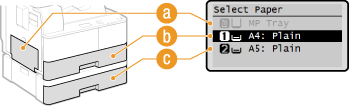
  Select the paper source (
 ,
,  ,
,  )
)
 |
< >
>
Selects the paper loaded in the multi-purpose tray.
< >
>
Selects the paper loaded in the drawer.
< >
>
Selects the paper loaded in the optional drawer.