Adjusting Density
 |
|
You can adjust the density of the copy if the text or images in a document are too light or dark. You can also adjust the background to remove the background color when document pages are lightly colored or yellowing.
|
|
NOTE
|
|
Adjust both the density and background when copying a document printed on thin paper, such as a newspaper, so that the text and images on the opposite side of the page are not visible in the copy.
|

 <Density>
  Adjust the density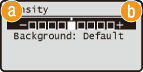
 <–>
<–>
Decreases the density.
 <+>
<+>
Increases the density.
Adjusting the background
<Density> <Background> Select <Auto> or <Adjust> 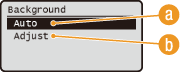
<Auto>
Select to set the machine to automatically adjust the background.
<Adjust>
Select to manually adjust the back ground.
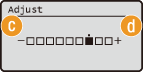
 <–>
<–>
Makes the background lighter.
 <+>
<+>
Makes the background darker.