Scanning 2-Sided Documents (imageRUNNER 1435iF / 1435i Only)
 |
|
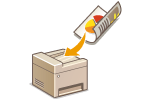
The machine can automatically scan the front and back sides of documents in the feeder.
|
|
IMPORTANT
|
|
The machine cannot scan both sides of documents automatically when the documents are placed on the platen glass.
|
|
NOTE
|
|
When the screen for specifying scan settings is displayed, you can specify the 2-sided scan setting by pressing
 (2-Sided/ID Card Copy), instead of selecting <2-Sided Original> as the procedure described below. (2-Sided/ID Card Copy), instead of selecting <2-Sided Original> as the procedure described below. |

 Specify destinations or connect the USB memory device <2-Sided Original>
  Select <Book Type> or <Calendar Type>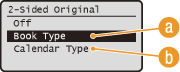
 <Book Type>
Select when the images on the front and back sides of the document face the same direction.
 <Calendar Type>
Select when the images on the front and back sides of the document face the opposite direction.