Adjusting Balance between File Size and Image Quality
 |
|
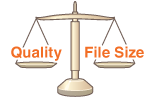
You can specify the file compression ratio that is applied when the documents are scanned in the file format you specified (Selecting a File Format). <Small: Memory Priority> makes the compression ratio higher than normal to create smaller files with lower image quality. On the other hand, <Large: Image Quality Priority> makes the compression ratio lower than normal larger files with higher image quality.
|

 Specify destinations or connect the USB memory device <Data Size>
  Specify the setting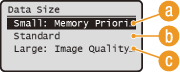
 <Small: Memory Priority>
The data size is highly compressed and reduced, but the image quality becomes low.
 <Standard>
The compression ratio and the image quality are adjusted to an intermediate setting between <Small: Memory Priority> and <Large: Image Quality Priority>.
 <Large: Image Quality Priority>
The image quality improves, but the data compression ratio decreased and data size becomes large.