Specifying Destinations in an LDAP Server (E-mail)
 |
|
If your office has an LDAP server installed, you can use the destinations registered in the server. To specify destinations, access an LDAP server via the machine, and then search for a destination.
|
|
NOTE
|
|
You need to specify the settings for connecting to an LDAP server beforehand.
|
1
Press  .
.
.2
Use  /
/ to select <Specify from LDAP Server>, and press
  .
.
/ to select <Specify from LDAP Server>, and press .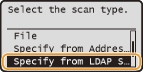
3
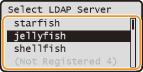
Select the LDAP server you are using, and press .
.
4
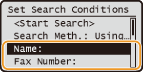
Select the search criterion, and press .
.Personal names, fax numbers, e-mail addresses, organization names, and department names are available criteria for searching destinations.
5
Enter the search keyword using the numeric keys, select <Apply>, and press .
.The following screen shows an example for when <Name> is selected in step 4 to search by personal name.
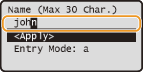
Pressing  toggles the input modes (except for searching by fax number).
toggles the input modes (except for searching by fax number).To specify multiple search criteria, repeat steps 4 and 5.
6
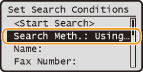
Select <Search Meth.>, and press .
.
7
Specify the search method, and press .
.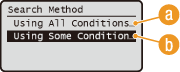
 <Using All Conditions Below>
Searches and displays the destinations that meet all the search criteria specified in steps 4 and 5.
 <Using Some Conditions Below>
All destinations meeting any of the search criteria specified in steps 4 and 5 are displayed as search results.
8
Select <Start Search>, and press .
.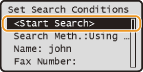
The destinations meeting your search criteria are displayed.
NOTE:
If the authentication screen appears when you start searching, enter the user name and password registered in the LDAP server, select <Apply>, and press . You can enter the user name and password of the machine or yours, depending on the setting (Registering LDAP Servers (imageRUNNER 1435iF / 1435i Only)). If you are not sure, ask your Network Administrator.
. You can enter the user name and password of the machine or yours, depending on the setting (Registering LDAP Servers (imageRUNNER 1435iF / 1435i Only)). If you are not sure, ask your Network Administrator.9
Select a destination, select <Apply>, and press .
.Up to 10 destinations can be specified.
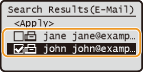
To search for a destination using other search criteria, repeat steps 2 to 9.
NOTE:
If you have already specified a destination using the numeric keys, up to nine destinations can be specified using an LDAP server.
You cannot specify the selected destinations as Cc or Bcc addresses.
 To delete destinations
If you specified multiple destinations, you can delete destinations as necessary.
|
1
|
Select <Confirm/Edit Destination>, and press
.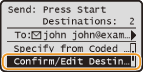 |
|
2
|
Select a destination you want to delete, and press
.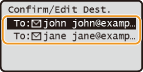 |
|
3
|
Select <Delete Destination>, and press
.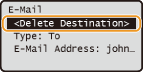 |
|
4
|
Select <Yes>, and press
. |
|
NOTE
|
If you want to easily and quickly delete destinations without displaying a list of destinationsBefore selecting <Confirm/Edit Destination> in step 1, you can press
 / / to toggle the destinations you specified. Display a destination you want to delete to toggle the destinations you specified. Display a destination you want to delete   <Yes> . <Yes> . |