Setting a Remote UI PIN
You can set a PIN for access to the Remote UI. All users use a common PIN.
|
NOTE
|
|
When Department ID Management is enabled (Setting the Department ID Management), this setting is not required.
|
1
Start the Remote UI and log on in System Manager Mode. Starting the Remote UI
2
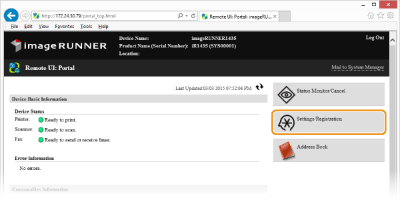
Click [Settings/Registration].
3
Click [Security Settings]  [Remote UI Settings].
[Remote UI Settings].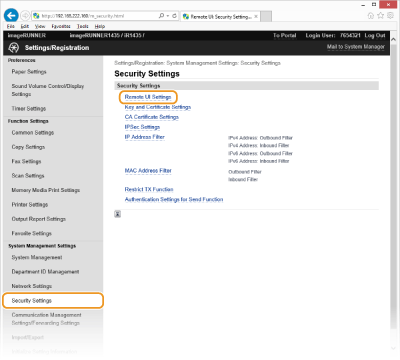
4
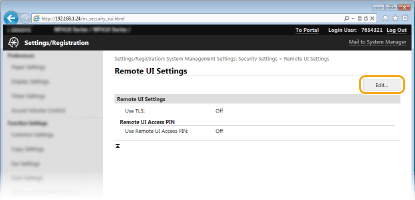
Click [Edit...].
5
Select the [Use Remote UI Access PIN] check box and set the PIN.
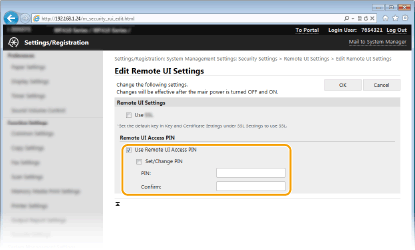
[Use Remote UI Access PIN]
If you select this check box, you must enter a PIN to access the Remote UI.
[Set/Change PIN]
To set a PIN, select the check box and enter a number of up to seven digits both in the [PIN:] and [Confirm:] text boxes.
6
Click [OK].
|
NOTE
|
If PIN is forgottenSet a new Remote UI Access PIN in the settings menu on the operation panel. Perform the following operation on the machine: Press
 <System Management Settings> <Remote UI Settings> <Remote UI Access Security Settings> <On> Enter PIN <Apply> Enter PIN (Confirm) <Apply> . <System Management Settings> <Remote UI Settings> <Remote UI Access Security Settings> <On> Enter PIN <Apply> Enter PIN (Confirm) <Apply> .If Remote UI settings are initializedThe Remote UI Access PIN is also initialized. After an initialization, reset the PIN. Initializing Menu
|