Settings Preview
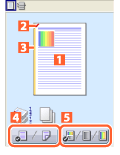
The current settings are shown in the preview on the left side of the print settings screen.
1.
Display the [Basic Settings], [Page Setup], [Finishing], or [Paper Source] tab.
2.
Click the page image or buttons in the preview.
You can configure the following settings.
 |
|
 N on 1 printing
 Stapling
 Binding location
 Switch between 1-sided printing and 2-sided printing
 Switch between color and black and white printing (color printers only)
References
Some print settings may not be correctly displayed in the preview.