Specifying Paper Size and Type in the Drawer
1
Select <Menu> in the Home screen. Home Screen
2
Select <Paper Settings for Mobile Print>  <Size/Type Settings>.
<Size/Type Settings>.3
Select the paper size.
If the loaded paper size is not displayed, select <Other Sizes>.

4
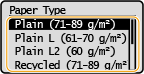
Select the paper type.