Cannot Register (Pair) a Bluetooth Compatible Device
To pair a device with the mobile terminal using Bluetooth, you need to enter a PIN code.
In the dialog box displayed on the mobile terminal, enter the PIN code displayed on the device.
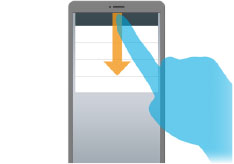
If the dialog box for entering the PIN code is not displayed
The dialog box is displayed by swiping from up to down on the screen of the mobile terminal.
If pairing does not complete after entering the PIN code
Bluetooth signals may not be able to be received from the device while the mobile terminal is communicating.
This problem may be able to be solved by disabling and then reenabling Bluetooth.
NOTE |
If the above operation does not solve the problem, disable [Bluetooth scanning] in the settings of the mobile terminal. Android 12.0 or later Disable [Location] > [Location services] > [Bluetooth scanning]. Android 10.0/11.0 Disable [Location] > [Wi-Fi and Bluetooth scanning] > [Bluetooth scanning]. Android 9.0 Disable [Location] > [Advanced] > [Scanning] > [Bluetooth scanning]. |