Optional Products Required for Each Function
This table describes the optional products needed to use each function, and the limitations when installing the optional products. Available options may differ depending on the model of the machine and your region.
Hardware Option
|
Function
|
Optional Product Required
|
|
|
Continuous feeding of long sheets*
|
External paper source
|
POD Buffer Unit-A1 + POD Deck-D1
|
|
Trim
|
Booklet Trimmer-F1
|
Saddle Finisher-AN2
|
|
Booklet Trimmer-F1 + Two-Knife Booklet Trimmer-A1
|
||
* This function is not available with imagePRESS Server B4000 and imagePRESS Server B5000.
Using the External Paper Source*
To use the external paper source, configure the settings for both the external paper source and the machine according to the paper loaded in the external paper source.
* This function is not available with imagePRESS Server B4000 and imagePRESS Server B5000.
Setting for Using Long Sheets
 |
|
If paper settings of the external paper source and the machine do not match, paper feeding problems may occur, which may cause a paper jam.
|
1
Load paper in the external paper source, and configure the paper settings.
For details, see the manual provided with the external paper source.
2
Select the paper source  on the control panel of this machine, and configure the paper settings, making sure the settings match with the external paper source.
on the control panel of this machine, and configure the paper settings, making sure the settings match with the external paper source.Configure the paper settings from the following screen of this machine:
 (Settings/Registration)
 [Preferences] [Paper Settings] [Paper Settings]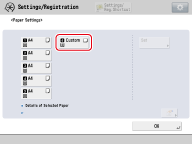
Be sure to select the paper source . The paper source is shown below.
. The paper source is shown below.POD Deck-D1/POD Buffer Unit-A1 + External paper source
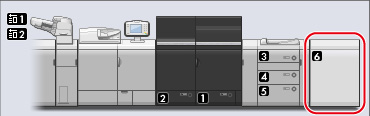

The paper source accepts paper sizes not available with the external paper source. Be sure to set sizes that are available with the external paper source.
accepts paper sizes not available with the external paper source. Be sure to set sizes that are available with the external paper source.External Paper Source Errors
When the external paper source is empty, or when paper cannot be fed due to problems such as paper jams, the following errors appear on the display.
|
Display
|
Cause and remedy
|
|
Display indicates there is no paper in the paper source
|
There is no paper in the external paper source. See the manual for the external paper source, and load paper.
A paper jam occurred in the external paper source. See “When a Paper Jam Occurs with Long Sheets” and remove the jammed paper.
|
|
The message ”Check the external paper source.” appears on the bottom of the display
|
There is no paper in the external paper source. See the manual for the external paper source, and load paper.
A paper jam occurred in the external paper source. See “When a Paper Jam Occurs with Long Sheets” and remove the jammed paper.
|
|
A pop-up screen containing the message “An error occurred in the external paper source. Check the external paper source.” appears on the display
|
Printing was attempted from the paper source
while in the following conditions.There is no paper in the external paper source.
A paper jam occurred in the external paper source.
Remove the cause of the trouble as appropriate for the situation.
|
|
|
|
If a long sheet has been output to the escape tray of the POD Deck-D1, be sure remove it so multiple sheets will not be stacked.
|