
POD Buffer Unit-A1
To use the external paper source, attach the POD Buffer Unit-A1 to the POD Deck-D1.
|
|
|
Be sure to ground the POD Deck-D1 before connecting its power plug to the power source. Also, be sure to remove the power plug from the power source before disconnecting the ground connection.
Open and close the paper deck gently. Opening it abruptly may move the POD Deck and cause the image position to be misaligned. If the image position is misaligned, adjust the image position.
|
Parts and Their Functions
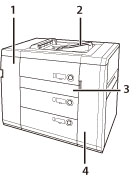
|
|
POD Deck-D1 + POD Buffer Unit-A1
|
|
1
|
Front Cover (Buffer Pass Unit)
Open this cover to remove jammed paper. |
|
2
|
Escape Tray
Outputs any subsequent paper when a paper jam occurs. Minimizes the paper jam removal procedures. |
|
3
|
Horizontal Pass Cover
Open this cover to remove jammed paper. |
|
4
|
Buffer Cover
Open this cover to remove jammed paper. |