Preparation for Using the Full-Text Search Function
With Desktop, you can use a full-text search function. Preparations are required to use the full-text search function of Desktop.
Configure the required settings according to your environment.
|
NOTE
|
|
To use the full text search function of Desktop on folders of a library that is not on the local drive, settings may be required on the server with the folders. Also, depending on the type of the library, you may not be able to use the full text search function. Consult the system administrator for details.
|
Registering a Folder to Windows Search
With Desktop, Windows Search is used for full text searches. If the search target library folders are on the local drive, register these folders to Windows Search.
|
NOTE
|
|
Windows Search is installed in a supported operating system by default, but it is recommended that you update Windows Search to the latest version.
|
1.
Start Windows Task Manager and select the [Services] tab.
2.
Confirm that the Windows Search service is enabled.
3.
Select the [Start] menu > [Control Panel] > [Indexing Options].
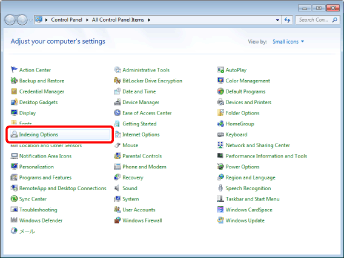
The [Indexing Options] is displayed.
|
NOTE
|
|
If you are using Windows 8.1, display Charms and select [Settings] > [Control Panel] > [Indexing Options].
For Windows 10, select the [Start] menu > [Windows System] > [Control Panel] > [Indexing Options].
If you cannot find [Indexing Options] in the Control Panel, change the Control Panel to the icon display.
|
4.
Click [Modify].
The [Indexed Locations] is displayed.
5.
Specify the folder to search in [Change selected locations].
Installing IFilter
Desktop uses IFilter for full-text searches of application documents such as PDF documents. Install the IFilter corresponding to each application document format, as necessary.
PDF documents: The IFilter for PDF documents is required.
IWB documents: The IFilter for IWB documents and the IFilter for PDF documents are required.
IFilter for PDF documents
The IFilter for PDF documents is installed in Windows 8.1/10 by default.
|
NOTE
|
|
To enable full text searches for PDF documents and IWB documents (*.iwb) in the following cases, obtain and install the appropriate IFilter for your environment from the Adobe Systems Inc. website.
When Acrobat DC/Adobe Acrobat Reader DC is being used in Windows 7
When a version of Acrobat DC/Adobe Acrobat Reader DC that was upgraded from Acrobat XI/Adobe Reader XI is being used in Windows 8.1
|
IFilter for IWB Documents
The IFilter for IWB documents is automatically installed when Desktop is installed.