Enabling the Database Link Function
To use databases with Desktop Editor or import address books using Excel or CSV files, one of the following applications must be installed in addition to Desktop.
Microsoft Office 2010/2013/2016
Microsoft Access Database Engine 2010 Redistributable (included with "Desktop Installation Media")
This section describes how to install Microsoft Access Database Engine 2010 Redistributable from "Desktop Installation Media".
|
NOTE
|
|
When using Microsoft Office 2010/2013/2016, the procedure indicated here is not required. However, if you are using Microsoft Office 2013, it may be necessary to install Microsoft Access Database Engine 2010 Redistributable , depending on your environment.
The Microsoft Access Database Engine 2010 Redistributable Installer in the "Desktop Installation Media" is displayed in English.
|
1.
Start Windows and log in to the system as a user with Administrator privileges.
2.
Insert the "Desktop Installation Media" disc into the disc drive.
|
NOTE
|
|
Close the window if the Desktop Setup Wizard is displayed.
|
3.
Run AccessDatabaseEngine.exe in the "AccessDBEngine" folder.
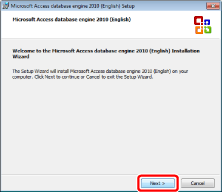
The [Microsoft Access database engine 2010 (English) Setup] is displayed.
4.
Confirm the displayed message and click [Next].
5.
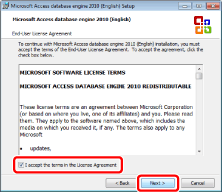
Confirm the content of the license agreement, select [I accept the terms in the License Agreement], and click [Next] to accept.
6.
Check the installation folder in the [Install Microsoft Access database engine 2010 (English) to:] field, and click [Install].
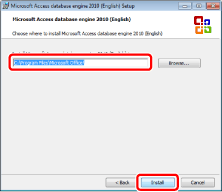
The installation starts. When the installation ends, the message is displayed.
|
NOTE
|
|
To change the installation folder, click [Browse] to select the installation folder.
|
7.
Click [OK].