Registering a Custom Paper Size
You can register one frequently used custom paper size.
1
Display the <Paper Settings> screen. Home Screen
Touch Panel Model
Select <Paper Set.> in the Home screen.
5 Lines LCD Model
Press  (Paper Setting).
(Paper Setting).2
Select <MP Tray> or <Drawer 1>  <Custom>.
<Custom>.3
Specify the length of the <X> side and <Y> side.
Execute the following steps in sequence: <X> enter the length of the <X> side using < > (
> ( ) / <
) / < > (
> ( ) <Apply> (
 ) <Y> enter the length of the <Y> side <Apply> () <Apply>
enter the length of the <X> side using <> () / <> () <Apply> () <Y> enter the length of the <Y> side <Apply> () <Apply>Touch Panel Model

5 Lines LCD Model

4
Select <Apply>.
5
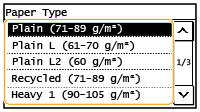
Select the paper type.