Registering Destinations for One-Touch Dial
You can conveniently register frequently used destinations for One-Touch Dial. Destinations can be quickly displayed by selecting One-Touch buttons in the Home Screen. You can edit or delete destinations that you have registered. You can register up to 4 destinations for One-Touch Dial.
1
Select <Addr. Book> in the Home screen. Home Screen
2
Select <Regist Dest.>.
If a screen appears prompting you to enter a PIN, enter the PIN for the Address Book and select <Apply>. Restricting Use of the Address Book
3
Select <One-Touch>  Select the type of address to register.
Select the type of address to register.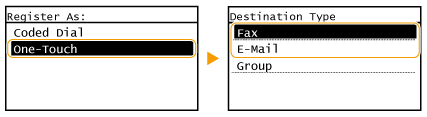
According to the address being registered, select <Fax> or <E-Mail>.
4
Select the number to register.
You can change this number to another number later.
5
Select <Name>.
Registering <Name> is optional. If you register <Name>, the destination can be searched alphabetically.
6
Enter the name, and select <Apply>.
On how to enter text, see Entering Text.
7
Select <Fax Number> or <E-Mail Address>.
8
Enter the destination, and select <Apply>.
 Making detailed settings (only when registered for fax)
After selecting <Details>, a screen similar to the following is displayed.
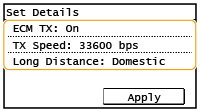
<ECM TX>
If an error occurs in an image that is being sent, the error is checked and corrected to prevent an improper image from being sent when setting <On>.
If an error occurs in an image that is being sent, the error is checked and corrected to prevent an improper image from being sent when setting <On>.
<TX Speed>
If it takes time for transmissions to start, such as when there is a poor telephone connection, you can adjust the transmission start speed downward.
If it takes time for transmissions to start, such as when there is a poor telephone connection, you can adjust the transmission start speed downward.
<Long Distance>
Specify <International (1)> to <International (3)> according to the transmission conditions when registering overseas fax numbers.
Specify <International (1)> to <International (3)> according to the transmission conditions when registering overseas fax numbers.
 |
|
You can make detailed settings for destinations <Menu>
<Fax Settings>. However, settings made from <Addr. Book> are enabled for the detailed settings of destinations registered in the Address Book. |
9
Select <Apply>.