Enlarging or Reducing
 |
|
You can enlarge or reduce copies by using a preset copy ratio such as <A5> → <A4>, or by setting a custom copy ratio in increments of 1%.
|
|
NOTE
|
|
<Copy Ratio> is not available when using <ID Card Copy>.
|
<Copy>  <Copy Ratio> Select the copy ratio
<Copy Ratio> Select the copy ratio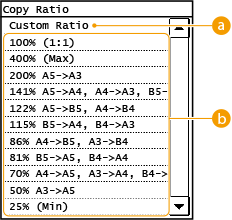
 <Custom Ratio>
Use  /
/ or the numeric keys to enter the copy ratio, and tap <Apply>. You can set any copy ratio from 25% to 400% in 1% increments.
/ or the numeric keys to enter the copy ratio, and tap <Apply>. You can set any copy ratio from 25% to 400% in 1% increments.
 Preset copy ratio
Select a copy ratio.