LDAP servera autentifikācijas norādīšana (e-pasts/koplietojama mape/failu serveris)
Lai ierobežotu faksu un e-pastu sūtīšanu vai saglabāšanu koplietojamās mapēs/failu serveros, iestatiet LDAP servera autentifikāciju. Kopā ar nodaļas ID pārvaldību tā ļauj ieviest daudz stingrākus drošības pasākumus.
1
Atveriet utilītprogrammu Remote UI (Attālais lietotāja interfeiss) un piesakieties sistēmas pārvaldnieka režīmā. Remote UI (Attālais lietotāja interfeiss) palaišana
2
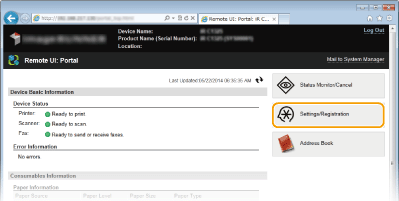
Noklikšķiniet uz [Settings/Registration].
3
Noklikšķiniet uz [Security Settings]  [Autentifikācijas iestatījumi sūtīšanas funkcijai].
[Autentifikācijas iestatījumi sūtīšanas funkcijai].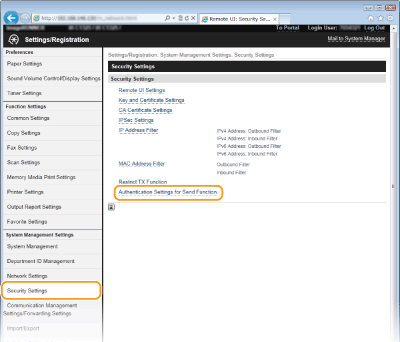
4
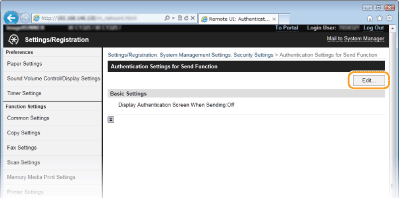
Noklikšķiniet uz [Edit...].
5
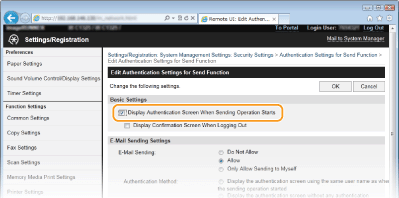
Atzīmējiet izvēles rūtiņu [Display Authentication Screen When Sending Operation Starts].
6
Norādiet vajadzīgos iestatījumus un noklikšķiniet uz [OK].
Atzīmējiet izvēles rūtiņu [Display Confirmation Screen When Logging Out], lai tiktu parādīts atteikšanās apstiprinājuma ekrāns.
E-pasta sūtīšanas iestatījumi
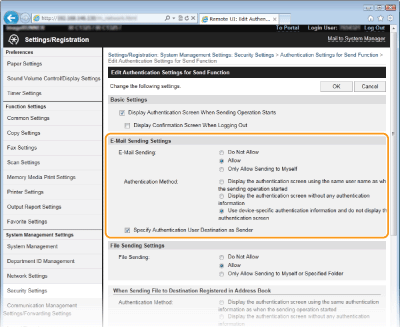
[E-pasta sūtīšana]
Norādiet, vai ir jāierobežo e-pasta sūtīšana. Izvēloties [Atļaut tikai sūtīšanu sev], e-pastu var nosūtīt tikai uz autentificēta lietotāja adresi.
[Authentication Method]
Iestatiet šo iestatījumu, ja kā [E-pasta sūtīšana] iestatījums ir izvēlēts [Allow] vai [Atļaut tikai sūtīšanu sev].
|
[Display the authentication screen using the same user name as when the sending operation started]
|
Izvēlieties, ja katram sūtīšanas gadījumam veicat autentifikāciju, izmantojot LDAP serverī iestatīto lietotājvārdu.
|
|
[Display the authentication screen without any authentication information]
|
Izvēlieties, ja ievadāt lietotājvārdu un paroli, lai autentificētu katru sūtīšanas gadījumu, izmantojot LDAP serverī iestatīto informāciju.
|
|
[Use device-specific authentication information and do not display the authentication screen]
|
Izvēlieties, ja autentificējat ar lietotājvārdu un paroli, kas iestatīta iekārtas e-pasta iestatījumos.
|
[Specify Authentication User Destination as Sender]
Atzīmējiet izvēles rūtiņu, lai atļautu autentificēta lietotāja e-pasta adresi iestatīt kā sūtītāju.
Failu sūtīšanas iestatījumi
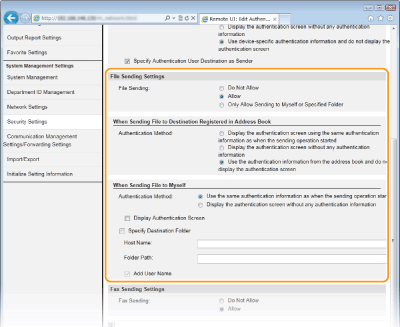
 [Failu sūtīšana]
Iestatiet, vai atļaut saglabāt koplietotās mapēs un failu serveros. Izvēlieties [Only Allow Sending to Myself or Specified Folder], lai atļautu datus saglabāt tikai jūsu adresē vai norādītajā mapē.
 [When Sending File to Destination Registered in Address Book]
Iestatiet, ja iestatījumam [Failu sūtīšanas iestatījumi] ir izvēlēta vērtība [Allow] un jūs sūtāt uz adrešu grāmatā reģistrētu adresi.
|
[Display the authentication screen using the same authentication information as when the sending operation started]
|
Izvēlieties, ja katram sūtīšanas gadījumam veicat autentifikāciju, izmantojot LDAP serverī iestatīto lietotājvārdu.
|
|
[Display the authentication screen without any authentication information]
|
Izvēlieties, ja ievadāt lietotājvārdu un paroli, lai autentificētu katru sūtīšanas gadījumu, izmantojot LDAP serverī iestatīto informāciju.
|
|
[Use the authentication information from the address book and do not display the authentication screen]
|
Izvēlieties, ja autentificējat, izmantojot adrešu grāmatā iestatītu lietotājvārdu un paroli.
|
 [Sūtot failu sev]
Iestatiet, ja iestatījumam [Failu sūtīšanas iestatījumi] ir izvēlēta vērtība [Allow] vai [Atļaut tikai sūtīšanu sev] un jūs sūtāt uz mapi, kas ir piešķirta LDAP serverī iestatītam lietotājam.
|
[Use the same authentication information as when the sending operation started]
|
Izvēlieties, ja autentificējat, izmantojot LDAP serverī iestatīto lietotājvārdu. Lai parādītu autentificēšanas ekrānu, atzīmējiet iestatījuma [Rādīt autentifikācijas ekrānu] izvēles rūtiņu.
|
|
[Display the authentication screen without any authentication information]
|
Izvēlieties, ja ievadāt lietotājvārdu un paroli, lai autentificētu katru sūtīšanas gadījumu, izmantojot LDAP serverī iestatīto informāciju.
|
[Norādīt adresāta mapi]
Iestatiet, ja norādāt adresi vai mapi, kas nav LDAP serverī iestatītajam lietotājam piešķirtā mape.
|
[Host Name]
|
Ievadiet LDAP servera resursdatora nosaukumu (līdz 120 rakstzīmēm).
|
|
[Folder Path]
|
Ievadiet līdz 120 rakstzīmēm. Lai mapes nosaukumam pievienotu LDAP serverī iestatītu lietotājvārdu (līdz 120 rakstzīmēm), atzīmējiet iestatījuma [Pievienot lietotājvārdu] izvēles rūtiņu.
|
Faksa sūtīšanas iestatījumi
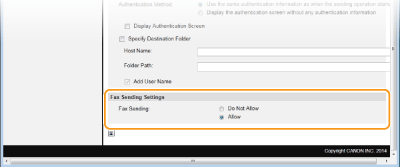
[Faksa sūtīšana]
Iestatiet, vai atļaut sūtīt faksu.