LDAP serverio autentifikavimo nurodymas (el. paštas / bendrai naudojamas aplankas / failų serveris)
Norėdami apriboti faksogramų ir el. laiškų siuntimą arba įrašymą bendrai naudojamuose aplankuose / failų serveriuose, nustatykite LDAP serverio autentifikavimą. Naudodami šią funkciją su skyriaus ID valdymu, sustiprinsite saugą.
1
Paleiskite priemonę „Remote UI“ (Nuotolinio vartotojo sąsaja) ir prisijunkite sistemos administratoriaus režimu. Priemonės „Remote UI“ (Nuotolinio vartotojo sąsaja) paleidimas
2
Spustelėkite [Settings/Registration].

3
Spustelėkite [Security Settings]  [Siuntimo funkcijos autentifikavimo parametrai].
[Siuntimo funkcijos autentifikavimo parametrai].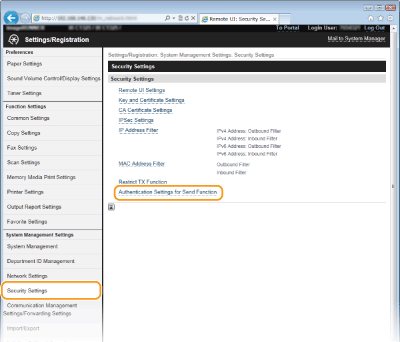
4
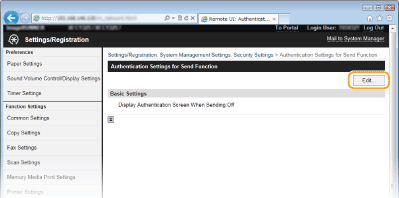
Spustelėkite [Edit...].
5
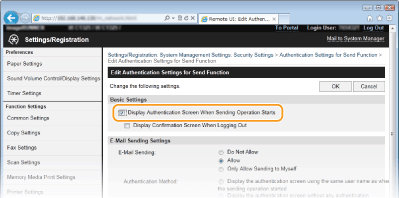
Pažymėkite žymės langelį [Display Authentication Screen When Sending Operation Starts].
6
Nurodykite reikiamus parametrus, tada spustelėkite [OK].
Pažymėkite žymės langelį [Display Confirmation Screen When Logging Out], kad būtų rodomas atsijungimo patvirtinimo ekranas.
El. pašto siuntimo parametrai
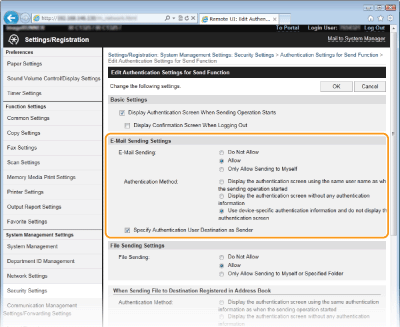
[El. pašto siuntimas]
Nustatykite, ar apriboti el. laiškų siuntimą. Pasirinkus [Leisti tik atsisiųsti] el. laiškus galima siųsti tik autentifikuoto vartotojo adresu.
[Authentication Method]
Nustatykite šį parametrą, tik jei parinktys [Allow] arba [Leisti tik atsisiųsti] pasirinktos dalyje [El. pašto siuntimas].
|
[Display the authentication screen using the same user name as when the sending operation started]
|
Pasirinkite, kai autentifikuosite kiekvieną siuntimą naudodami LDAP serveryje nustatytą vartotojo vardą.
|
|
[Display the authentication screen without any authentication information]
|
Pasirinkite įvesdami vartotojo vardą ir slaptažodį, kad autentifikuotumėte kiekvieną siuntimą pagal LDAP serveryje nustatytą informaciją.
|
|
[Use device-specific authentication information and do not display the authentication screen]
|
Pasirinkite, kai autentifikuosite naudodami aparato el. pašto parametruose nustatytą vartotojo vardą ir slaptažodį.
|
[Specify Authentication User Destination as Sender]
Pažymėkite žymės langelį, kad leistumėte autentifikuotą vartotojo el. pašto adresą nustatyti kaip siuntėją.
Failų siuntimo parametrai
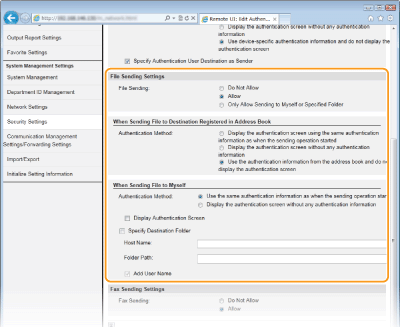
 [Failo siuntimas]
Nustatykite, ar leisti įrašyti į bendrai naudojamus aplankus ir failų serverius. Pasirinkite [Only Allow Sending to Myself or Specified Folder], kad leistumėte įrašyti duomenis tik į savo adresą arba nurodytą aplanką.
 [When Sending File to Destination Registered in Address Book]
Nustatykite, kai [Allow] pasirinkta dalyje [Failo siuntimo parametrai] ir siunčiate adresų knygelėje registruotu adresu.
|
[Display the authentication screen using the same authentication information as when the sending operation started]
|
Pasirinkite, kai autentifikuosite kiekvieną siuntimą naudodami LDAP serveryje nustatytą vartotojo vardą.
|
|
[Display the authentication screen without any authentication information]
|
Pasirinkite įvesdami vartotojo vardą ir slaptažodį, kad autentifikuotumėte kiekvieną siuntimą pagal LDAP serveryje nustatytą informaciją.
|
|
[Use the authentication information from the address book and do not display the authentication screen]
|
Pasirinkite, kai autentifikuosite naudodami adresų knygelėje nustatytą vartotojo vardą ir slaptažodį.
|
 [Atsisiunčiant failą]
Nustatykite, kai [Allow] arba [Leisti tik atsisiųsti] pasirinkta dalyje [Failo siuntimo parametrai] ir siunčiate į LDAP serveryje nustatytam vartotojui priskirtą aplanką.
|
[Use the same authentication information as when the sending operation started]
|
Pasirinkite, kai autentifikuosite naudodami LDAP serveryje nustatytą vartotojo vardą. Kad būtų rodomas autentifikavimo ekranas, pažymėkite žymės langelį [Rodyti autentifikavimo ekraną].
|
|
[Display the authentication screen without any authentication information]
|
Pasirinkite įvesdami vartotojo vardą ir slaptažodį, kad autentifikuotumėte kiekvieną siuntimą pagal LDAP serveryje nustatytą informaciją.
|
[Nurodyti adresato aplanką]
Nustatykite nurodydami kitą adresą arba aplanką negu LDAP serveryje nustatytam vartotojui priskirtas aplankas.
|
[Host Name]
|
Įveskite daugiausia 120 simbolių LDAP serverio pagrindinio kompiuterio vardą.
|
|
[Folder Path]
|
Įveskite daugiausia 120 simbolių. Norėdami prie aplanko pavadinimo pridėti LDAP serveryje nustatytą vartotojo vardą (iki 120 simbolių), pažymėkite žymės langelį [Įtraukti naudotojo vardą].
|
Faksogramų siuntimo parametrai
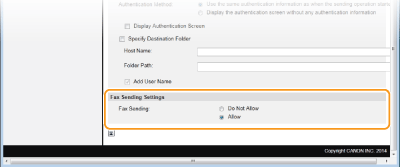
[Fakso siuntimas]
Nustatykite, ar leisti siųsti faksogramas.