Available Paper
Supported Paper Sizes
Paper sizes that can be loaded in the paper drawer, multi-purpose tray, or optional paper sources are listed below.
 : Available
  : Unavailable
Paper Size | Paper Drawer*1 | Multi-Purpose Tray | Automatic 2-Sided Printing*2 |
A3 | | | |
B4 | | | |
A4 | | | |
B5 | | | |
A5 | | | |
A6 | | | |
Ledger (11x17) | | | |
Legal (LGL) | | | |
Letter (LTR) | | | |
Statement (STMT) | | | |
Executive (EXEC) | | | |
Foolscap (FLSC) | | | |
305x457 mm/12x18 in | | | |
8K | | | |
16K | | | |
Index Card | | | |
Indian Legal (India-LGL) | | | |
Postcard | | | |
Reply Postcard | | | |
4 on 1 Postcard | | | |
Envelope NAGAGATA 3 | | | |
Envelope KAKUGATA 2 | | | |
Envelope YOUGATANAGA 3 (Younaga 3) | | | |
Envelope No. 10 (COM10) | | | |
Envelope Monarch | | | |
Envelope C5 (ISO-C5) | | | |
Envelope DL | | | |
Custom Paper Size | *3 | *4 | *5 |
*1Includes the optional Paper Feeder PF-G/ Cassette Feeding Unit-AU. *2Automatic 2-sided printing is available without replacing paper. *3The following sizes are available: When loaded in portrait orientation (only with the Canon Generic Plus UFR II printer driver used): Width 148.0 mm to 297.0 mm, Length 148.0 mm to 297.0 mm When loaded in landscape orientation: Width 148.0 mm to 297.0 mm, Length 148.0 mm to 431.8 mm *4The following sizes are available: When loaded in portrait orientation (only with the Canon Generic Plus UFR II printer driver used): Width 120.0 mm to 320.0 mm, Length 120.0 mm to 320.0 mm When loaded in landscape orientation: Width 64.0 mm to 320.0 mm, Length 120.0 mm to 457.2 mm Width 200.0 mm to 297.0 mm, Length 457.3 mm to 1200.0 mm (long size: only with the Canon Generic Plus UFR II printer driver used) *5The following sizes are available: Width 148.0 mm to 320.0 mm, Length 148.0 mm to 457.2 mm | |||
 |
Some paper sizes may not be displayed depending on the printer driver. If the paper size that you want to use is not displayed, download suitable printer driver from the Canon website. If you cannot download, contact your local authorized Canon dealer or the Canon help line. |
Supported Paper Types
Chlorine-free paper can be used with this machine.
|
Print quality may deteriorate depending on the paper type used. |
: Available : UnavailablePaper Type | Paper Drawer*1 | Multi-Purpose Tray | Automatic 2-Sided Printing*2 | |
Plain L2 | 60 g/m² | | | |
Plain L*3 | 60 g/m² to 74 g/m² | | | |
Plain*3 | 75 g/m² to 90 g/m² | | | |
Heavy 1 | 91 g/m² to 120 g/m² | | | |
Heavy 2 | 121 g/m² to 163 g/m² | | | |
Heavy 3 | 164 g/m² to 220 g/m² | *4 | | |
Heavy 4 | 221 g/m² to 256 g/m² | *4 | | |
Heavy 5 | 257 g/m² to 300 g/m² | | | |
Coated 1 | 100 g/m² to 130 g/m² | | | |
Coated 2 | 131 g/m² to 160 g/m² | | | |
Coated 3 | 161 g/m² to 220 g/m² | | | |
Rough 1 | 60 g/m² to 74 g/m² | | | |
Rough 2 | 75 g/m² to 103 g/m² | | | |
Labels | | | | |
Postcard*5 | | | | |
Envelope | | | | |
*1Includes the optional Paper Feeder PF-G/ Cassette Feeding Unit-AU. *2Automatic 2-sided printing is available without replacing paper. *3Recycled paper is also available. *4When loading paper with length of 364.0 mm or more in landscape orientation, the basis weight of the paper must not be 199 g/m² or more. *5The inkjet printable postcard or reply postcard cannot be used. | ||||
Paper Types Available with POP Printing Optimization
The paper types that are available when [POP Printing Optimization] is configured on the printer driver are as follows.
|
For more information on [POP Printing Optimization], see the manuals for the relevant drivers on the online manual website. When [POP Printing Optimization] is configured, the 2-sided printing function cannot be used. You can use paper of those sizes that can be specified as custom size. However, print quality may deteriorate when you use paper with a width of 199.0 mm or less or 298.0 mm or more. Use of paper with a width of 200.0 mm to 297.0 mm is recommended. |
: Available : UnavailablePaper Type*1*2 | Paper Weight | POP Printing Speed*3 | |
<Mode 1> | <Mode 2> | ||
Plain | 75 g/m² to 90 g/m² | *4 | |
Heavy 1 | 91 g/m² to 120 g/m² | *4 | |
Heavy 2 | 121 g/m² to 128 g/m² | *4 | |
129 g/m² to 163 g/m² | *5 | | |
Coated 1 | 100 g/m² to 130 g/m² | *6 | |
Coated 2 | 131 g/m² to 160 g/m² | *6 | |
*1If you configure [POP Printing Optimization], you need to specify the paper type to use.
*2When an unsupported paper type is detected, an error message is displayed. Replace it with a supported paper type and then perform printing.
*3For details on settings change or related subjects, see POP Printing Speed.
*4Print quality may deteriorate depending on the environmental conditions. If the quality of the printout is not acceptable, setting to <Mode 2> is recommended.
*5Print quality may deteriorate regardless of the environmental conditions.
*6Even when the setting is <Mode 1>, printing is performed as with <Mode 2>.
Paper Type and Setting for the Machine
Printable Area
The shaded area in the image below indicates the printable area of the document. | ||
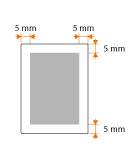 | For Envelope NAGAGATA 3 and Envelope YOUGATANAGA 3, the top and bottom margins are 10 mm and the left and right margins are 5 mm. For all other envelopes, the top, bottom, left, and right margins are all 10 mm. For paper with width of 312 mm or more, the left and right margins are 5 mm or more. | |