Back Side
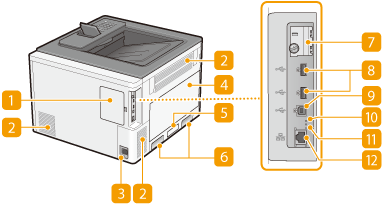
 Back cover
Open the back cover to install the optional ROM. Installing the ROM
 Ventilation slot
Air from inside the machine is vented out to cool down the inside of the machine. Note that placing objects in front of the ventilation slots prevents ventilation. Installation
 Power socket
Connect the power cord.
 Left cover
Open the left cover when replacing the waste toner container. How to Replace the Waste Toner Container
 Rating label
The label shows the serial number, which is needed when making inquiries about the machine. For more information, see "Troubleshooting (FAQ)" on the online manual website.
 Lift handles
Hold the lift handles when carrying the machine. Relocating the Machine
 SD card slot cover
Open the SD card slot cover when installing the optional SD card. Installing an SD Card
 USB port (for USB device connection)
Connect a USB device that is used with MEAP applications. Also, connect a USB memory device when exporting or importing the settings of the machine (Import/Export Set.).
 USB port (for computer connection)
Connect a USB cable when connecting the machine and a computer.
 ACT indicator
The ACT indicator blinks while data is being sent or received.
 LNK indicator
The LNK indicator blinks green when the machine is properly connected to a network.
 LAN port
Connect a LAN cable when connecting the machine to a wired LAN router, etc. Connecting to a Wired LAN