Display
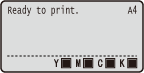 | The display shows the printing status and the screens for specifying settings. It also shows error messages and toner cartridge status. |
Main Screen
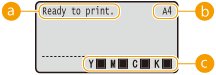
 Status indication
Displays the current status or operation mode of the machine.
 Paper size indication
Displays the currently selected paper size.

The following paper sizes are shown in an abbreviated form.
Ledger: LD Legal: LG Letter (landscape) : LTR Letter (portrait) : LT Statement (landscape) : STR Statement (portrait) : ST Executive (landscape) : EXR Executive (portrait) : EX Foolscap: FC 305x457 mm/12x18 in: TxE Index Card: IC Indian Legal: ILG Postcard: PD | Reply Postcard: P2 4 on 1 Postcard: P4 Envelope KAKUGATA 2: K2 Envelope NAGAGATA 3: N3 Envelope YOUGATANAGA 3: YN3 Envelope No. 10 (COM10): CO Envelope Monarch: MO Envelope ISO-C5: EC5 Envelope DL: DL Free Size: FR Custom Paper Size Landscape: 80R Custom Paper Size Portrait: 80 |
 Toner cartridge status indication
Displays the status of toner cartridges.
Menu Screen
Press  (
( ),
),  (
( ),
),  (
( ),
),  (
( ), or
), or  (
( ) to display the corresponding menu screen. The screen displayed when () is pressed is shown below as an example.
(), (), (), (), or () to display the corresponding menu screen. The screen displayed when () is pressed is shown below as an example.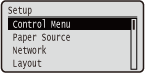
When an Error Occurs
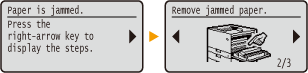
In some cases when an error occurs, instructions on how to respond to the error are displayed. Follow the on-screen instructions to solve the problem. The screen displayed when a paper jam occurs is shown below as an example. For more information about the displayed messages, see "Troubleshooting (FAQ)" on the online manual website.