
Paper Jams Inside the Main Unit
Check the paper jam location on the screen, and follow the procedure below to remove the paper.
|
Confirm before handlingThe cover does not open while the main unit front cover lock indicator is lit. Follow the instructions on the screen. Close the cover that is open. |
1
Open the front cover of the main unit, and turn the dial.
 | Open the front cover of the main unit. |
 | Turn the green knob (  ) counterclockwise 15 times (about 4 revolutions). ) counterclockwise 15 times (about 4 revolutions).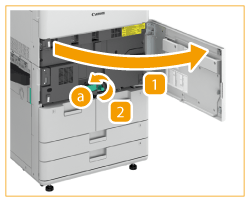 |
2
Check whether paper is jammed in the fixing transport unit.
| Grip the green lever ( ) and pull out the fixing transport unit.
| ||
| If paper is jammed, gently pull it out in the direction of the arrow. 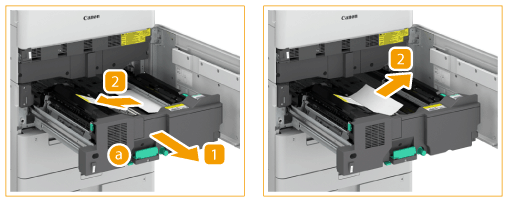 |

3
Check whether paper is jammed in the edge guide.
| Open the edge guide ( ). |
| If paper is jammed, gently pull it out in the direction of the arrow with the edge guide open. 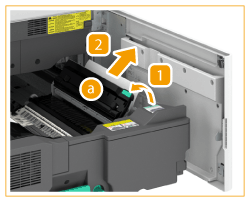 |
 | Close the edge guide. |
4
Check whether paper is jammed in the inner output unit.
| Open the inner output unit ( ).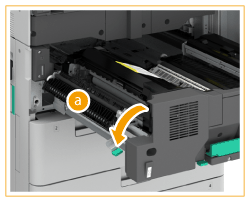 | ||
| Open the inner output guide (  ). ). | ||
| If paper is jammed, gently pull it out in the direction of the arrow with the inner output guide open. 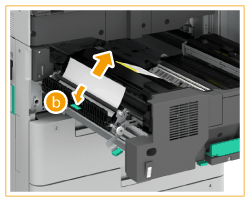
| ||
 | Return the inner output unit to its original position. |
5
Check whether paper is jammed in the duplexing guide.
| Hold the green tab ( ) and open the duplexing guide.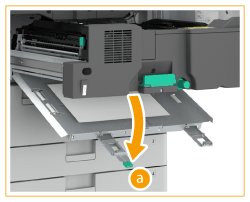 |
| If paper is jammed, gently pull it out in the direction of the arrow. 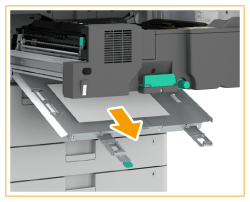 |
| Close the duplexing guide. |
6
Return the fixing transport unit to its original position.
7
Gently close the front cover of the main unit until they click.
Continue following the instructions on the screen to proceed with the interrupted operation or continue clearing paper jams.