Registering Destinations
Destinations for sending faxes and scanned data can be registered in the Address Book or one-touch buttons.
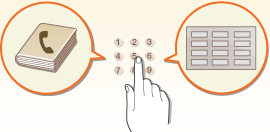
Address Book
If you want to register many destinations or classify them by department or business partner, register them in the Address Book. The Address Book allows you to search destinations by the first character of the name or by selecting a destination type such as fax or e-mail. You can register destinations for all users, destinations for your own use, and destinations that only an administrator can edit. For more information, see "Registering Destinations in the Address Book" in the User's Guide.
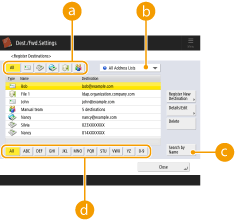
 Destination type button
Select the button to filter destinations by destination type such as fax or e-mail.
 Address list drop-down list
Select an address list for a department or business partner.
 <Search by Name>
Enter the destination name.
 First letter button
Select the alphanumeric button for the first character of the destination name.
One-Touch Button
You can register frequently used destinations in one-touch buttons to simplify operations. The one-touch buttons with registered destinations are displayed on the touch panel display, enabling you to quickly search and specify the destinations with the simple press of a button. For more information, see "Registering a Destination in a One-Touch Button" in the User's Guide.
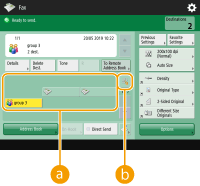
One-touch button
You can easily specify the desired destination with the simple press of a button.
One-touch number button
You can enter the three-digit number of a registered one-touch button if it is not shown on the touch panel display.
 |
For the administratorThe Address Book and one-touch buttons can be exported/imported. This can be used for backup data if a failure occurs or to simplify the procedure for registering destinations between supported machines. For more information, see "Backing Up/Restoring Data" in the User's Guide. The Address Book can be personalized for each logged-in user. For more information, see "List of Items That Can Be Personalized" in the User's Guide. Furthermore, the Synchronize Custom Settings facility can be used to enable the Address Book to be shared by a number of Canon multifunction printers. For more information, see "Synchronizing Settings for Multiple Canon Multifunction Printers" in the User's Guide. You can set a password to avoid unauthorized editing or deletion in the Address Book. For more information, see "Setting a PIN for Address Book" in the User's Guide. If there are destinations that you do not want to display in the Address Book or if you want to limit user access to destinations, enter an access number when registering a destination. To use the access number, it is necessary to enable <Manage Address Book Access Numbers> in advance. For more information, see "Restricting Access to Destinations Registered in the Address Book" in the User's Guide. Configure User Group Address Lists from the Remote UI. For more information, see "Registering Destinations via the Remote UI" in the User's Guide. |