Changing Curl Correction on the First Side of 2-Sided Printing
If the corners of thin or plain paper are folded or bent during 2-sided printing, the [Corr Curl fr 1st Sd of 2Sd Pg] for registered custom paper types can be changed.
IMPORTANT |
If the paper corners are folded or bent during 2-sided printing, make sure to adjust the [Corr Curl fr 1st Sd of 2Sd Pg]. Otherwise, paper jams may occur. |
1.
Press  (Settings/Registration).
(Settings/Registration).2.
Press [Preferences] → [Paper Settings] → [Paper Type Management Settings].
3.
Select the paper type that you want to edit from the list → press [Details/ Edit].
4.
Press [Change] for <Corr Curl fr 1st Sd of 2Sd Pg>.
5.
Select settings → press [OK].
NOTE | ||||||||
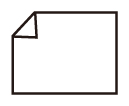
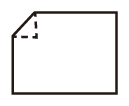
Judge corner-fold surfaces when the paper has been output into the output tray. Set by matching to the paper face on which corner fold occurred.
|

6.
Press [OK].