Appendix
Relationship Between the Original Orientation and Paper Orientation
Use this appendix when stapling output printed on paper that is preprinted with a logo, etc.
NOTE |
If you are copying onto the back side of a previously printed sheet, load the paper as indicated below. Paper Deck or POD Deck-D/Secondary POD Deck-D: Load the side to copy on face down. POD Deck Lite-C: Load the side to copy on face up. |
When Stapling on the Right
Other Settings | Example of Stapling Position | |||
Corner: Top Right Double: Right  A4 | Corner: Top Right Double: Top  A3, A4R | Corner: Top Right  A4 | Corner: Top Right Double: Right  A3, A4R | |
Preprinted paper | ||||
Loading location: Paper Deck, POD Deck-D/Secondary POD Deck-D Preprinted paper: Face down |  |  |  |  |
Loading location: POD Deck Lite-C Preprinted paper: Face up |  |  | 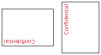 |  |
Original | ||||
Loading location: Platen glass Original: Face down |  |  |  |  |
Stapling setting | Corner: Top Right Double: Right | Corner: Bottom Right Double: Right | Corner: Top Right | Corner: Top Right Double: Right |
Loading location: Feeder Original: Face up |  |  |  |  |
Stapling setting | Corner: Top Right Double: Right | Corner: Bottom Right Double: Right | Corner: Top Right | Corner: Top Right Double: Right |
Auto Rotation Setting | Both ON and OFF available | Both ON and OFF available | Both ON and OFF available (ON when loaded vertically in the POD Deck Lite-C/POD Deck-D/Secondary POD Deck-D) | Both ON and OFF available |
When Stapling on the Left
Other Settings | Example of Stapling Position | |||
Corner: Top Left Double: Left  A4 | Corner: Top Left Double: Top  A3, A4R | Corner: Top Left  A4 | Corner: Top Left Double: Left  A3, A4R | |
Preprinted paper | ||||
Loading location: Paper Deck, POD Deck-D/Secondary POD Deck-D Preprinted paper: Face down |  |  |  |  |
Loading location: POD Deck Lite-C Preprinted paper: Face up |  |  | 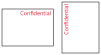 |  |
Original | ||||
Loading location: Platen glass Original: Face down | | | | |
Stapling setting | Corner: Top Left Double: Left | Corner: Top Right Double: Right | Corner: Top Left | Corner: Top Left Double: Left |
Loading location: Feeder Original: Face up | | | | |
Stapling setting | Corner: Top Left Double: Left | Corner: Top Right Double: Right | Corner: Top Left | Corner: Top Left Double: Left |
Auto Rotation Setting | Both ON and OFF available | Both ON and OFF available | Both ON and OFF available (ON when loaded vertically in the POD Deck Lite-C/POD Deck-D/Secondary POD Deck-D) | Both ON and OFF available |
When Not Stapling
Other Settings | Example of Stapling Position | |||
 A4 |  A3, A4R |  A4 |  A3, A4R | |
Preprinted paper | ||||
Loading location: Paper Deck, POD Deck-D/Secondary POD Deck-D Preprinted paper: Face down |  | | | |
Loading location: POD Deck Lite-C Preprinted paper: Face up | | | | |
Original | ||||
Loading location: Platen glass Original: Face down | | | | |
Loading location: Feeder Original: Face up | | | | |
Auto Rotation Setting | Both ON and OFF available (ON when loaded horizontally in the POD Deck Lite-C/POD Deck-D/Secondary POD Deck-D) | Both ON and OFF available | Both ON and OFF available (ON when loaded vertically in the POD Deck Lite-C/POD Deck-D/Secondary POD Deck-D) | Both ON and OFF available |