Removable HDD Kit/HDD Data Encryption & Mirroring Kit
The Removable HDD Kit can hold the optional hard disk. You can remove and store the hard disks in a safe place when the machine is not in use. When the HDD Data Encryption & Mirroring Kit is used with the Removable HDD Kit, you can store the same data on two hard disks and you can encrypt the data and store the hard disks in a safe place.
Parts and Their Functions
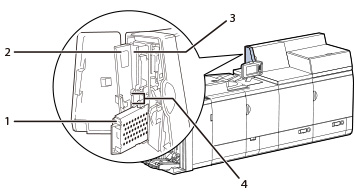
1. | Hard Disk Holder Holds the hard disk. To store the hard disk, place it in the hard disk holder. |
2. | Front Cover Open this cover to set/remove the hard disk holder. |
3. | PWR Indicator Lights when power is supplied to the HDD. |
4. | Operation Indicators When the HDD is operating, the ACT indicator lights. In the event of an error, the ERR indicator lights. |
NOTE |
For the following cases, contact your local authorized dealer. Adding removable HDD under the standardly-equipped HDD when installing the HDD Data Encryption & Mirroring Kit Utilizing the standardly-equipped HDD as removable HDD If the message <E602-0001> appears on the touch panel display when the machine starts, a hard disk may not be inserted in the Removable HDD Kit.Turn OFF the main power of the machine, check that the PWR indicator on the attached part of the hard disk is not lit, and then check theRemovable HDD Kit. If the error message still appears after you correctly set the hard disk, contact your local authorized Canon dealer. |