
Optional Equipment
By combining options, you can use functions more efficiently.
When the Staple Finisher-AC/Booklet Finisher-AC is installed
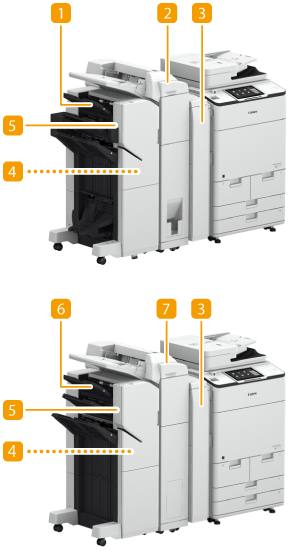
 Booklet Finisher-AC
You can perform collating, grouping, stapling (Corner/Double/Booklet), and saddle folding with this option. In addition, you can manually bind with the stapler or bind without the stapler. Staple Finisher-AC/Booklet Finisher-AC/2/4 Hole Puncher Unit-A/4 Hole Puncher Unit-A
 Document Insertion / Folding Unit-K
If you install the "Document Insertion / Folding Unit-K" in the "Staple Finisher-AC" or "Booklet Finisher-AC," you can fold output paper, and paper different from the original paper can be fed as a cover or insert pages. Document Insertion / Folding Unit-K
 Buffer Pass Unit
Delivers paper to the finisher. Staple Finisher-AC/Booklet Finisher-AC/2/4 Hole Puncher Unit-A/4 Hole Puncher Unit-A
 2/4 Hole Puncher Unit-A/4 Hole Puncher Unit-A
If you install the "2/4 Hole Puncher Unit-A" or "4 Hole Puncher Unit-A" in the "Staple Finisher-AC" or "Booklet Finisher-AC," you can punch holes in your printouts. Staple Finisher-AC/Booklet Finisher-AC/2/4 Hole Puncher Unit-A/4 Hole Puncher Unit-A
 Finisher Jogger Kit-A
If you attach the "Finisher Jogger Kit-A" to the "Staple Finisher-AC" or "Booklet Finisher-AC", the edges of output sheets can be aligned. Staple Finisher-AC/Booklet Finisher-AC/2/4 Hole Puncher Unit-A/4 Hole Puncher Unit-A
 Staple Finisher-AC
You can perform collating, grouping, and stapling (Corner/Double) with this option. In addition, you can manually bind with the stapler or bind without the stapler. Staple Finisher-AC/Booklet Finisher-AC/2/4 Hole Puncher Unit-A/4 Hole Puncher Unit-A
 Document Insertion Unit-Q
If you install the "Document Insertion Unit-Q," paper different from the original paper can be fed as a cover or insert pages. Document Insertion Unit-Q
When Other Options are Installed
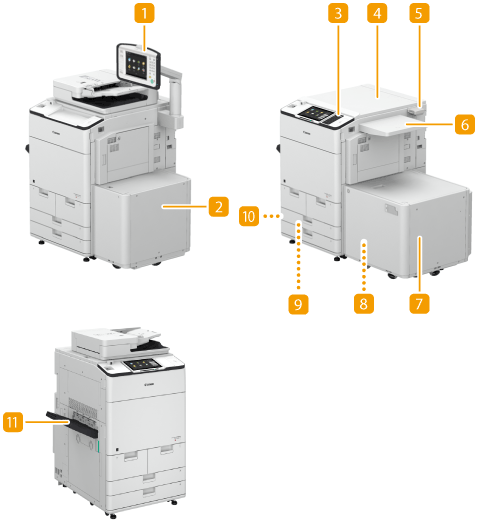
Upright Control Panel-J
If you install "Upright Control Panel-J," you can adjust the position and angle so as to easily see the touch panel display. Control Panel
Paper Deck Unit-E
If you install the "Paper Deck Unit-E" to the machine, you have an additional large-capacity paper deck. POD Deck Lite-C/Paper Deck Unit-E
Numeric Keypad
Attaching a Numeric Keypad allows you to use keys on the Numeric Keypad instead of certain buttons on the touch panel display. Numeric Keypad
Printer Cover-H
Install this option if you use the machine as a printer. Printer Cover-H
Copy Card Reader
You can implement Department ID Management using the card reader. Copy Card Reader
Utility Tray-B
This option provides space for placing documents.
POD Deck Lite-C
If you install the "POD Deck Lite-C" to the machine, you have an additional large-capacity paper deck. POD Deck Lite-C/Paper Deck Unit-E
 Envelope Feeder Attachment-G
If you install the Envelope Feeder Attachment-G, you can load envelopes in the POD Deck Lite-C.
 Envelope Feeder Attachment-F
If you install the Envelope Feeder Attachment-F, you can load envelopes in the paper drawer.
 Tab Feeding Attachment-F
Attach the "Tab Feeding Attachment-F" to load tab paper into the paper drawers of the machine. This option can hold only A4 tab paper.
 Copy Tray-R
Install to use finish functions such as Collate, Group, and Rotate 90 Degrees. Copy Tray-R
|
For information on the combination of options that can be installed on the machine, contact your dealer or service representative. Some of the settings may not be displayed depending on the configuration of optional equipment installed on the machine. |