
One Touch Color Mode
| You can intuitively select the image quality with a single button, such as having subtle colors or having a retro finish like an old photograph. |
1
Place the original. Placing Originals
2
Press <Copy>. <Home> Screen
3
Press <Options> on the Copy Basic Features screen. Copy Basic Features Screen
4
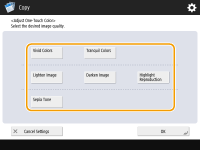
Press <Adjust OneTouch Color>.
5
Select the desired image quality.
Example adjustment:
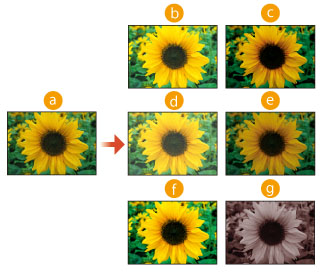
 Original
 Vivid Colors
 Tranquil Colors
 Lighten Image
 Darken Image
 Highlight Reproduction
 Sepia Tone
If you select <Highlight Reproduction>, the image quality is adjusted so that highlights are not blown out.
You can select multiple types of image quality at the same time. However, <Vivid Colors> and <Tranquil Colors> cannot be selected at the same time, and <Lighten Image>, <Darken Image>, and <Highlight Reproduction> cannot be selected at the same time.
6
Press <OK>  <Close>.
<Close>.7
Press  (Start).
(Start).Copying starts.
 |
The settings in <Options> <Color Balance> automatically change according to the image quality you select.If you select <Sepia Tone>, <Single Color (Sepia Tone) > is displayed in <Select Color> on the Basic Features screen. If you are printing a document in the Mail Box with <Access Stored Files>, you cannot specify <Vivid Colors> and <Tranquil Colors>. |