Uninstalling This Software
This section describes the method for uninstalling this software.
NOTE |
If you do not have the installer used when installing this software, uninstall this software in [Settings] > [Apps & Features] > [Canon Data Collection Agent] in Windows. |
1.
Log on to the computer as a user with Administrator privileges.
2.
Exit all application software that is running.
3.
Double-click the [DCA installer.msi] file used when installing this software.
4.
On the [Welcome to the Setup Wizard for Canon Data Collection Agent] screen, click [Next].
5.
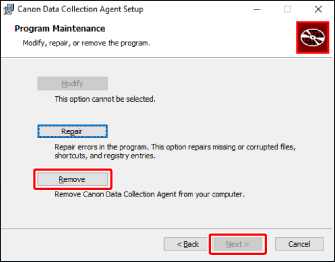
On the [Program Maintenance] screen, select [Remove] and click [Next].
6.
On the [Ready to Remove Application] screen, click [Remove].
A screen indicating the progress of uninstallation is displayed.
If the [Setup of Canon Data Collection Agent is not complete.] screen is displayed, select whether to exit the application, and click [OK]. Restart the computer and execute the uninstallation again.
7.
On the [Setup of Canon Data Collection Agent is complete.] screen, click [Finish].