卸载本软件
本节介绍卸载本软件的方法。
附注 |
如果没有安装本软件时使用的安装程序,请在 Windows 的 [Settings] > [Apps & Features] > [Canon Data Collection Agent] 中卸载本软件。 |
1.
以具有管理员权限的用户身份登录计算机。
2.
退出所有正在运行的应用程序软件。
3.
双击安装本软件时使用的 [DCA installer.msi] 文件。
4.
在 [Welcome to the Setup Wizard for Canon Data Collection Agent] 屏幕中,单击 [Next]。
5.
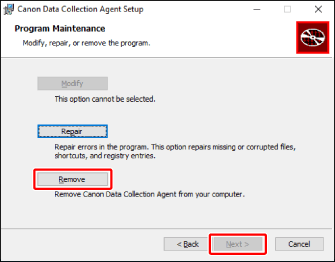
在 [Program Maintenance] 屏幕中,选择 [Remove],然后单击 [Next]。
6.
在 [Ready to Remove Application] 屏幕中,单击 [Remove]。
显示指示卸载进程的屏幕。
如果显示 [Setup of Canon Data Collection Agent is not complete.] 屏幕,请选择是否退出应用程序,然后单击 [OK]。重新启动计算机并再次执行卸载程序。
7.
在 [Setup of Canon Data Collection Agent is complete.] 屏幕中,单击 [Finish]。