 . The <Home> screen displays a list of function buttons and acts as the entrance to various functions. Items Displayed on the <Home> Screen
Basic Screens on the Touch Panel Display
This section describes the various screens displayed on the touch panel display.
<Home> Screen
The <Home> screen is displayed when you press . The <Home> screen displays a list of function buttons and acts as the entrance to various functions. Items Displayed on the <Home> Screen
. The <Home> screen displays a list of function buttons and acts as the entrance to various functions. Items Displayed on the <Home> Screen | 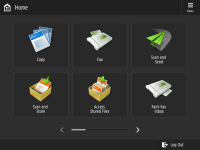 | |
(Models with an upright control panel) |
Basic Features Screen of Each Function
On the <Home> screen, press the function buttons to display the Basic Features screen where you can access basic functions such as copying, faxing and scanning. Though the display and setting items on the Basic Features screen differ depending on functions, you can change the settings to suit your needs. Customizing the Basic Features Screen
Example: Copy Basic Features screen
Example: Copy Basic Features screen
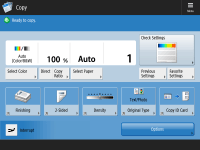
Items displayed differ depending on functions.
<Settings/Registration> Screen
Press  (Settings/Registration) to display the <Settings/Registration> screen. Press this key first to make changes for each setting, such as paper settings, display settings, and network settings. On this screen, you can also register destinations, such as e-mail addresses and fax numbers.
(Settings/Registration) to display the <Settings/Registration> screen. Press this key first to make changes for each setting, such as paper settings, display settings, and network settings. On this screen, you can also register destinations, such as e-mail addresses and fax numbers.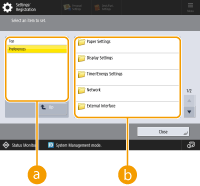
 Current menu level
You can check which level is being displayed for the entire Settings/Registration menu.
 Setting item list
Setting items that belong to the current menu level are displayed in a list.

When there is no menu under the lower level, the setting screen is displayed.
<Status Monitor> Screen
When you press  (Status Monitor), the <Status Monitor> screen is displayed. On this screen, you can check the printing status and transmission status, as well as the remaining amount of toner and memory level.
(Status Monitor), the <Status Monitor> screen is displayed. On this screen, you can check the printing status and transmission status, as well as the remaining amount of toner and memory level.
Status and logs of copy/print/transmission/saved documents
The current status or log of the selected item is displayed. You can cancel copying, printing, and fax transmission on this screen.
Consumables
You can check the status of the machine, such as the amount of toner or paper remaining and memory levels.
Error Screen
In some cases when an error occurs, instructions on how to respond to the error are displayed. Follow the on-screen instructions to solve the problem. Countermeasures for Each Message
Example: When a paper jam occurs
Example: When a paper jam occurs
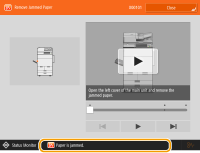 (Items shown on the screen may differ depending on your model and options.) |
TIPS |
Press  displayed on the <Home> screen and the Basic Features screen to customize the screen such as rearranging buttons or creating a shortcut key. Customizing the Touch Panel Display displayed on the <Home> screen and the Basic Features screen to customize the screen such as rearranging buttons or creating a shortcut key. Customizing the Touch Panel Display You can change settings regarding the screen display, such as which screen appears immediately after turning ON the machine, and whether the message appears for remaining paper and toner. <Display Settings> You can set the screen to be displayed when a certain amount of time has passed without operation. <Function After Auto Reset> |
|
 indicates that data on the storage device is encrypted. Managing Storage Device Data indicates that data on the storage device is encrypted. Managing Storage Device Data |