Exporting Address Lists from Devices
If the Address Book Management Plug-in was operated with iW Management Console V3.x, export the address list from a device that was managed with the Address Book Management Plug-in.
1.
Export the address list from the device.
NOTE |
The operation may differ according to the model of the device. For details, see the following. Device instruction manuals |
Start the Web browser, and log in to the Remote UI of the device.
http://<IP address or host name of the device>/
Select [Set Destination] in [Settings/Registration] > [Function Settings].
Select [Address Book Export Settings].
To include passwords included in address lists in the file to export, enable [Include Password When Exporting Address Book].
Select [Data Management] in [Settings/Registration] > [Management Settings].
Click [Address Lists] in [Import/Export Individually].
Click [Export].
On the [Export Address Lists] screen, configure the various settings.
For [File Format], select [Custom Format] or [CSV Format].
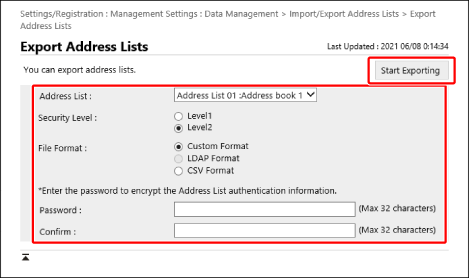
Click [Start Exporting].
Follow the instructions on the screen to save the file.