Exporting Device Settings Information
If the Device Configuration Management Plug-in was used in iW Management Console V3.x, export the device settings information from iW Management Console V3.x.
IMPORTANT |
Device settings information created in the Device Configuration Management Plug-in cannot be exported. Exported device settings information can be imported to Enterprise Management Console V4.x as data for delivery. It cannot be imported as device settings information to use as the standard for monitoring device setting values. |
1.
Log in to iW Management Console V3.x.
2.
Export the device settings information.
Select [Device] > [Configuration Management] > [Device Settings Information Management] > [List of Retrieved Device Settings Information] from the menu.
Select the device settings information to export.
Only one type of device settings information can be exported at once.
Click [Export].
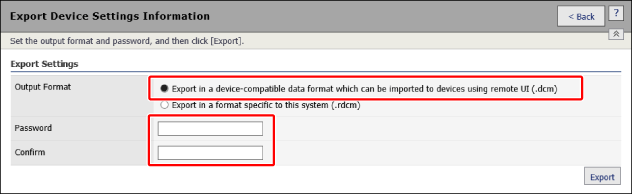
In [Export Settings], select [Export in a device-compatible data format which can be imported to devices using remote UI (.dcm)] as the format to output.
The following information is not included in files exported in this format.
[Comments]
[Source/Type]
[Device Name]
[IP Address]
Enter the same pasword in [Password] and [Confirm].
The password to enter differs according to when and how the device settings information was registered to the Device Configuration Management Plug-in.
Device settings information retrieved in version 1.5.0 or later of the plug-in
Enter the same password as that set on the following screen.
[Device] > [Configuration Management] > [Device Settings Information Management] > [Encryption Password Management] > [Encryption Password Settings]
IMPORTANT |
If the encryption password has been changed after retrieving the target device settings information to export from the device, enter the encryption password before change (the encryption password set when the device settings information was retrieved). |
Device settings information retrieved in a version of the plug-in earlier than version 1.5.0 (when upgrading from an older version)
Any password can be set.
If you set the same password as that set on the following screen, the same password can be used regardless of when the device settings information was retrieved.
[Device] > [Configuration Management] > [Device Settings Information Management] > [Encryption Password Management] > [Encryption Password Settings]
Device settings information imported from a file
Enter the password that was entered when importing.
Click [Export].
Follow the instructions in the dialog box to save the file.