Checking/Editing Device Information
Check whether information has been retrieved from devices. If [Comments] has been entered in [Device List] in iW Management Console V3.x, refer to that information to enter [Note 1] and [Note 2] on the [Device Details] page of the devices registered in [Device List] in Enterprise Management Console V4.x.
Refer to the following settings of iW Management Console V3.x.
[Comments] field in [Device] > [List] > [Device List]
NOTE |
Changes to [Device Name] and [Location] are reflected to devices. The number of characters that can be set differs according to the device. Enter a string that does not exceed the maximum number of characters that can be set for the device. When a URL is specified in [Link], [  ] is displayed in the [Link] column of the device list. Click [] to open the page of the URL. For details on displaying the [Link] column in the device list, see the following. ] is displayed in the [Link] column of the device list. Click [] to open the page of the URL. For details on displaying the [Link] column in the device list, see the following."Displaying the Device List" in the User's Guide |
Checking/Editing Detailed Information for Devices Separately
1.
Select the [Devices] menu > [Device List].
2.
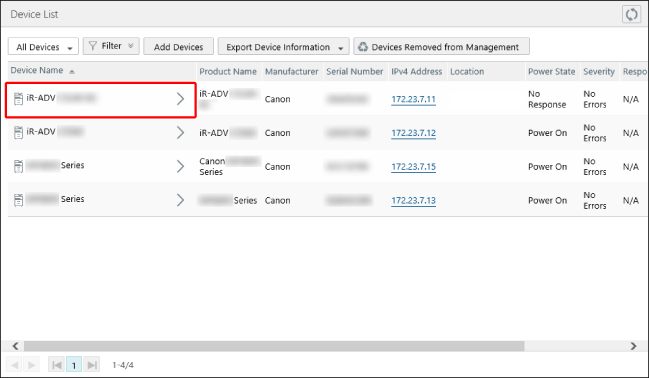
On the [Device List] page, select the device name of the target device from the list.
3.
Check the information retrieved from devices.
4.
If [Comments] has been entered in [Device List] in iW Management Console V3.x, enter [Note 1] and [Note 2] on the [Device Details] page.
5.
Click [Update].
Batch Editing Detailed Information
The same settings can be specified for multiple devices.
1.
Select the [Devices] menu > [Device Batch Processing] > [Batch Configure Device Information].
2.
In [Basic Device Info], select [Note 1] and [Note 2], and enter the information.
3.
In [Target Devices], specify the target devices.
Click [Groups] or [Devices], and select the target device groups or devices.
If you selected [Devices], you can apply a filter to filter the devices displayed in the list.
A maximum of 5,000 devices can be selected at a time.

Click [Selected], and confirm that the selected devices and device groups are displayed.
Click [Update].