导出设备设置值
如果实在 iW Management Console V3.x 中使用 Device Configuration Management Plug-in,则从 iW Management Console V3.x 导出设备设置信息。
须知 |
无法导出在 Device Configuration Management Plug-in 中创建的设备设置信息。 导出的设备设置信息可作为交付数据导入 Enterprise Management Console V4.x。无法作为设备设置信息导入以用作监控设备设置值的标准。 |
1.
登录 iW Management Console V3.x。
2.
导出设备设置信息。
从菜单中选择 [Device] > [Configuration Management] > [Device Settings Information Management] > [List of Retrieved Device Settings Information]。
选择要导出的设备设置信息。
一次只能导出一种类型的设备设置信息。
单击 [Export]。
在 [Export Settings] 中,选择 [Export in a device-compatible data format which can be imported to devices using remote UI (.dcm)] 作为输出的格式。
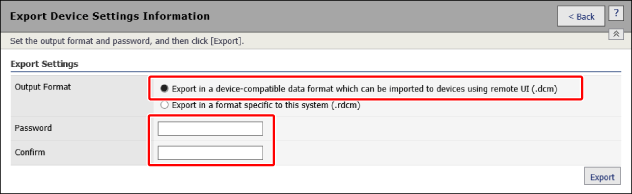
以此格式导出的文件不包含以下信息。
[Comments]
[Source/Type]
[Device Name]
[IP Address]
在 [Password] 和 [Confirm] 中输入相同的密码。
根据设备设置信息注册到 Device Configuration Management Plug-in 的时间和方式,输入的密码有所不同。
在 1.5.0 或更高版本插件中检索的设备设置信息
输入与在以下屏幕上设置的密码相同的密码。
[Device] > [Configuration Management] > [Device Settings Information Management] > [Encryption Password Management] > [Encryption Password Settings]
须知 |
如果在检索要从设备导出的目标设备设置信息之后更改了加密密码,则输入更改前的加密密码(检索设备设置信息时设置的加密密码)。 |
在早于 1.5.0 的插件版本中检索的设备设置信息(从旧版升级时)
可以设置密码。
如果设置的密码与在以下屏幕上设置的密码相同,则无论何时检索设备设置信息,都可以使用相同的密码。
[Device] > [Configuration Management] > [Device Settings Information Management] > [Encryption Password Management] > [Encryption Password Settings]
从文件导入的设备设置信息
输入在导入时键入的密码。
单击 [Export]。
按照对话框中的说明保存文件。