Configuring Ethernet Settings
 | Ethernet is a standard for communicating data in a local area network (LAN). You can set the communication mode and the Ethernet type. In general, the machine can be used without changing the defaults (<Ethernet Driver Settings>), but you can change these settings to suit your network environment. |
1
Select <Menu> in the Home screen. Home Screen
2
Select <Preferences>  <Network>.
<Network>.If the login screen appears, enter the correct ID and PIN. Logging in to the Machine
3
Select <Ethernet Driver Settings>.
4
Select whether to configure Ethernet settings automatically or manually.
If auto-detection is enabled, the machine detects and automatically sets the Ethernet communication mode and the type that can be used.
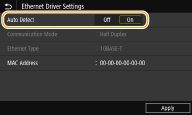
 Configuring Ethernet settings automatically
Select <On> in <Auto Detect>.
Configuring Ethernet settings manually
1 | Select <Off> in <Auto Detect>. |
2 | <Communication Mode> select the communication mode.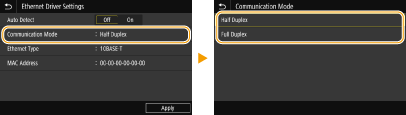 <Half Duplex> Alternately sends and receives communication data. Select when the machine is connected to a networking device using half duplex. <Full Duplex> Simultaneously sends and receives communication data. Use this setting for most environments. |
3 | <Ethernet Type> select the Ethernet type. |
4 | Select <Apply>. |
5
Select <OK>.
6
Restart the machine. Restarting the Machine