The inspection system is a system that inspects the quality of printed images based on master images and settings, and also automatically reads and inspects printed characters and barcodes and validates them against a CSV file.
The entire system which is composed of the unit and software (Inspection Tool) required for inspection and validation, and the printer, controller, etc. needed for printing is referred to as the inspection system.
Overview of the Inspection System
The person who issues printing instructions creates an inspection job by using the Inspection Tool. The inspection job contains the master images and inspection standard settings. The person who performs printing tasks executes inspection jobs created by the person who issues printing instructions and confirm the inspection results.
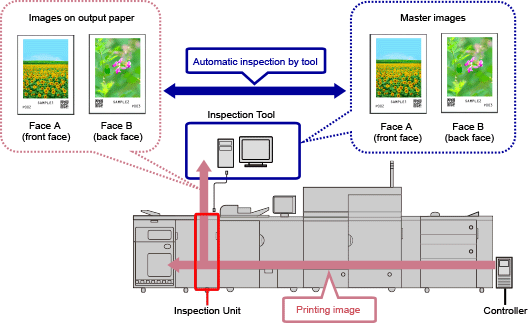
Overview of the Inspection Tool
The Inspection Tool is software that is used to perform inspection of output paper. The Inspection Tool can perform the following tasks.
Creating inspection jobs
Registering fonts
Scan characters from the font registration chart into the Inspection Tool and register the font information.
Creating master images
Scan the images to be inspected into the Inspection Tool to create the images to use as the basis for inspection, based on images with no quality problems. You can create an inspection job for each print job.
Setting inspection standards
Set the inspection standards for determining whether there are problems in the image quality, and in the results of scanning and validating text and barcodes.
Executing inspection jobs
The Inspection Tool scans the image that was output to the paper. For images, the images are compared against master images and it is checked that the comparison result exceeds the inspection standards. For text and barcodes output to the paper, it is checked that they can be scanned. When text and barcodes output to the paper are validated against the strings in a CSV file, it is checked that there are no problems in the validation result.
Managing inspection jobs
Existing inspection jobs can be managed from the management screen. The inspection results can also be output as a report.