 <Adjustment/Maintenance> <Maintenance>
 <Adjustment/Maintenance> <Maintenance>
1 | Select <Set> on the <Home> screen. <Home> Screen |
2 | Select <Adjustment/Maintenance> <Maintenance> <Clean Pressure Roller for Fixing>. |
3 | Load A4 or letter size plain paper in the paper drawer or multi-purpose tray, then press  . . |
4 | Load the cleaning paper in the multi-purpose tray with the printed side face down and the arrow pointing to the far side of the machine. Load the paper with the printed side face down. 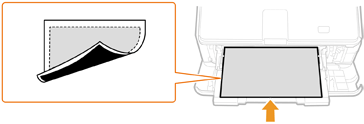 Set the paper size to A4 or letter and the paper type to plain.  If any paper remainsRemove the loaded paper, then load the cleaning paper. |
5 | Press .The paper is slowly fed to start cleaning the pressure roller for fixing. |