[Volume Settings] Screen
You can set whether the machine emits sounds notifying you of operations and statuses.
When you press the Sound Volume key ( ) on the operation panel, the [Volume Settings] screen is displayed.
When you press the Sound Volume key (
) on the operation panel, the [Volume Settings] screen is displayed. 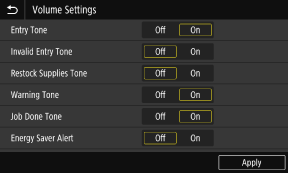
[Entry Tone]
Set whether to emit a sound when you press the keys and buttons on the operation panel.
Set whether to emit a sound when you press the keys and buttons on the operation panel.
[Invalid Entry Tone]
Set whether to emit a sound when an invalid key is pressed, such as when you enter a value outside the setting range.
Set whether to emit a sound when an invalid key is pressed, such as when you enter a value outside the setting range.
[Restock Supplies Tone]
Set whether to emit a sound when the toner cartridges are nearing the end of their lifetime.
Set whether to emit a sound when the toner cartridges are nearing the end of their lifetime.
[Warning Tone]
Set whether to emit a sound when the machine has a paper jam or other malfunction.
Set whether to emit a sound when the machine has a paper jam or other malfunction.
[Job Done Tone]
Set whether to emit a sound when the print operation is completed.
Set whether to emit a sound when the print operation is completed.
[Energy Saver Alert]
Set whether to emit a sound when the machine enters and exits sleep mode.
Set whether to emit a sound when the machine enters and exits sleep mode.