<Acceptance Delay for Repeated Presses> (Ver. 3.20-)
 /
/  (Settings/Registration)
  <Preferences> <Accessibility>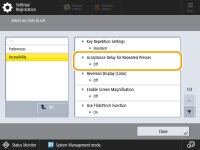
You can now specify the amount of time during which the machine does not accept the second and subsequent key inputs when a key on the on-screen keyboard is unintentionally pressed repeatedly. Configure this setting in cases such as when you intend to enter a single character, but the same character is entered repeatedly.
Settings/Registration Table
For details on how to view the Settings/Registration Table, see "Settings/Registration" "Settings/Registration Table" in the "User's Guide."
"Settings/Registration Table" in the "User's Guide."Item | Setting Description | DeviceAdmin | NetworkAdmin | Can be set in Remote UI | Device Information Delivery Available | Import All Function | Name of Item When Exporting with the Remote UI |
<Acceptance Delay for Repeated Presses> | <On>, <Off> <On>: 0.1 to 1.0 sec. | Yes | Yes | No | No | C | Settings/Registration Basic Information |