
Changes Related to Remote Operation
 (Ver. 3.22-)
Support for Remote Operation via the Remote UI
 (Settings/Registration)
  <Management Settings> <License/Other> Setting <Remote Operation Settings> to <On> will cause [Remote Operation] to be displayed on the Remote UI portal page, from which Remote Operation can be enabled.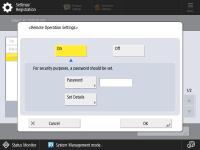
|
When using remote operation by connecting “Canon Remote Operation Viewer” or “Canon PRINT”, <Allow Operation Not Via Remote UI> must be set to <On>. If you are using remote operation with Safari, you need to register the TLS server certificate configured on the machine. Register using macOS Keychain Access and set the added certificate to "Always Trust". |
 |
When enabling remote operation, you can also set the followings in <Set Details>. Users who are allowed to operate via the Remote UI Whether to allow operations that do not go through the Remote UI Time until the remote operation times out When <Remote Operation Settings> is set to <On>, <Remote UI> is also set to <On>. |