
<DNS Encryption Settings> (Ver. 3.22-)
 (Settings/Registration)
  <Preferences> <Network> <TCP/IP Settings> <DNS Settings>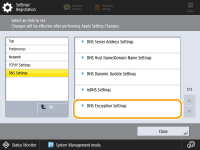
You can now set whether to encrypt communication with the DNS server using TLS. Security can be enhanced by encrypting communication with the DNS server using TLS.
|
If the encrypted communication fails, it will not switch to unencrypted communication, and will not be able to connect to the DNS server. Enter the host name listed in the Subject Alternative Name (SAN) of the certificate obtained from the DNS server in <Host Name to Verify>. |
Settings/Registration Table
For details on how to view the Settings/Registration Table, see "Settings/Registration" "Settings/Registration Table" in the "User's Guide."
"Settings/Registration Table" in the "User's Guide."Item | Setting Description | DeviceAdmin | NetworkAdmin | Can be set in Remote UI | Device Information Delivery Available | Import All Function | Name of Item When Exporting with the Remote UI |
<DNS Encryption Settings> | <Use DNS over TLS>: <On>, <Off> <Port Number to Use>: 1 to 853 to 65535 <Host Name to Verify>: <Host Name> | No | Yes | Yes | No | C | Settings/Registration Basic Information |