Checking Device Details
This section describes the method for checking the detailed information of devices registered in this software.
1.
Select the [Devices] menu > [Monitored Device List].
Device information can also be checked from the list on the following page.
[Devices] menu > [Monitored Device List] > [Manage Devices] > [Managed Devices]
[Devices] menu > [Monitored Device List] > [Manage Devices] > [Devices Removed from Management] (Only when HTTPS is the protocol for communication with the Remote Monitoring Server)
2.
Select the target Device ID from the list.
For the [Devices Removed from Management] page, select the serial number.
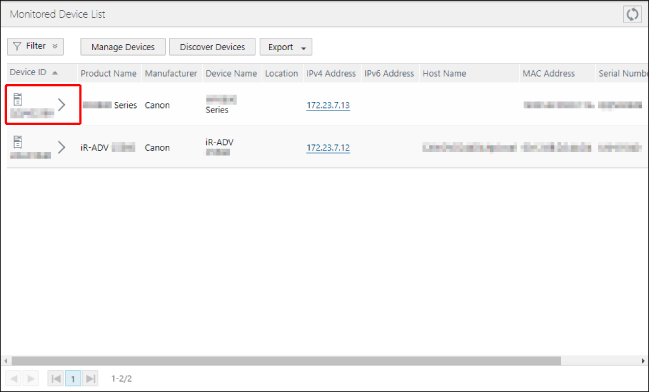
3.
Perform the required operation on the [Device Details] page.
NOTE |
If only some information is displayed, execute [Retrieve Device Information] task. |
When HTTPS Is the Protocol for Communication with the Remote Monitoring Server
[Ability to Be Monitored] | This item is displayed for a device not set for monitoring. Click [Check Functionality] to check whether the device has the ability to send data to the Remote Monitoring Server. This button is enabled for a device without a function check performed or a device without this function. |
[Registration Status] | This item is displayed for a device set for monitoring. [Register]: This button is enabled for a device not registered to the Remote Monitoring Server. Click this button to register the device to the Remote Monitoring Server. [Communication Test]: This button is displayed for a device registered to the Remote Monitoring Server with [CCA] selected for [Monitoring Method]. Click this button to check whether the Remote Monitoring Server is communicating with the device normally. |
[Communication Test Result] | This item is displayed for a device registered to the Remote Monitoring Server with [CCA] selected for [Monitoring Method]. The results of the communication test are displayed in the list. |
When SMTP Is the Protocol for Communication with the Remote Monitoring Server
[Device ID] | [Device ID] can be edited if all the following conditions are met. [Get Device Management Information] is set to [Allowed] [Device ID] is not set Managed Devices of This Software Less than 1,000 devices with [Device ID] set |
[Get Device Management Information] | Click [Check Functionality] to check whether the device has the ability to send data to the Remote Monitoring Server. [Check Functionality] is disabled in either of the following cases. Monitored devices of this software [Device ID] is not set and 1,000 or more devices with [Device ID] set are registered in this software |
[Remove from Management] | Removes the displayed device from management. If you perform this operation on a monitored device, that device is no longer monitored. |
[Manually Send Billing Counter]
NOTE |
These items are displayed in the following cases when the [Device Details] page is displayed from the [Managed Devices] page. When HTTPS is the protocol for communication with the Remote Monitoring Server, [Monitoring Mode] is set to [CCA Mode], and [Monitoring Method] is set to [Polling] on the device When HTTPS is the protocol for communication with the Remote Monitoring Server and [Monitoring Mode] is set to [Standard Mode] When SMTP is the protocol for communication with the Remote Monitoring Server |
[Reset Department Counter] | Specify the operation to perform after collecting billing counters and sending them to the Remote Monitoring Server. Only displayed when HTTPS is the protocol for communication with the Remote Monitoring Server and [Monitoring Mode] is set to [Standard Mode]. |
[Send Reset] | Enabled: Reset the department counters. Disabled: Do not reset the department counters. The setting is disabled when the [Device Details] page is displayed. This setting is not saved. |
[Retrieve and Send Now] | Collects billing counters and sends them to the Remote Monitoring Server. Subsequent operations follow the setting in [Reset Department Counter]. |
[Sending History] | Displays the results of up to 10 sending operations executed within seven days of the current date and time. |
4.
If you have changed the settings, click [Update].