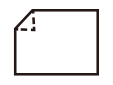
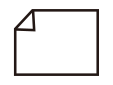
If a corner is folded when printing on both sides of thin paper or plain paper, change the curl correction setting on the first side of two-sided printing for registered custom paper.
Reducing a Folded Corner when Printing on Both Sides
 |
This mode may affect paper feeding. Since increasing the value to a great extent may cause paper jams, adjusting the values in small increments is recommended. If a corner is folder while printing on both sides, inappropriate curl correction settings on the first side of two-sided printing may result in a paper jam. |
1
Press  Settings/Registration.
Settings/Registration.2
Press <Preferences>  <Paper Settings> <Paper Type Management Settings>.
<Paper Settings> <Paper Type Management Settings>.3
Select the paper type that you want to edit from the list press <Details/Edit>.
press <Details/Edit>.4
Press <Change> for <Rdc. Corner Bending for 2-Sd. Print>.
5
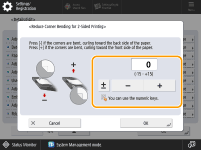
Press <-> or <+> to adjust the curl correction.
6
Press [OK].
Paper curl is negated by adjusting the paper in the opposite direction to which it is curled. Make test prints on the paper that you have adjusted, and check the curl correction level.
 | ||||||
To determine the direction of the paper curl or folded corners, place the paper in the same direction as it is output to the tray.
|