
Paper Jams in the Front Cover of the Main Unit
Check the paper jam location on the screen, and follow the procedure below to remove the paper.
Paper jam locations are indicated by number such as C2 or C3, which are shown in the illustration below.
Paper jam locations are indicated by number such as C2 or C3, which are shown in the illustration below.
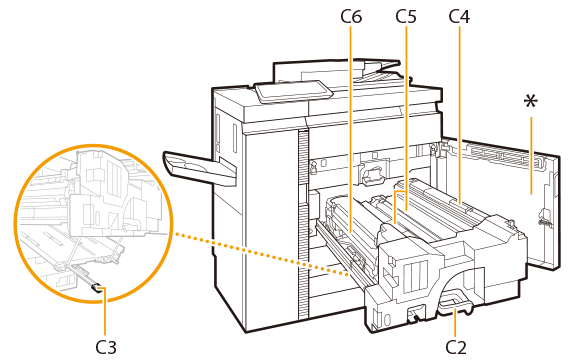
* Front Cover
1
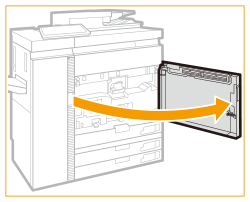
Open the front cover of the main unit.
2
Check whether paper is jammed in the fixing transport unit.
| Tilt the C2 lever to the left to release the lock. |
 | Holding the C2 lever, pull the fixing transport unit out.   The fixing unit and its surroundings are subject to high-temperatures. When removing jammed paper, take care not to touch anything in this area.  If the C2 lever lock indicator (  ) lights up in red, the C2 lever cannot be unlocked. Follow the instructions on the screen to remove the jammed paper. ) lights up in red, the C2 lever cannot be unlocked. Follow the instructions on the screen to remove the jammed paper. |
3
Check whether paper is jammed in the duplexing guide (C3).
| Open the C3 guide. |
| If paper is jammed, gently pull it out in the direction of the arrow. 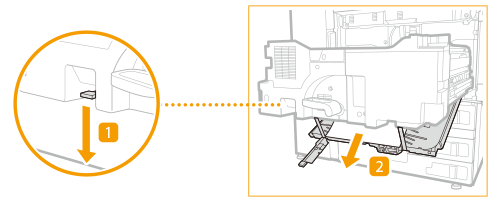 |
 | Close the C3 guide. |
4
Check whether paper is jammed in the upper pre-realignment guide (C4).
| Open the C4 guide. |
| If paper is jammed, gently pull it out in the direction of the arrow keeping the C4 guide open by Hand. 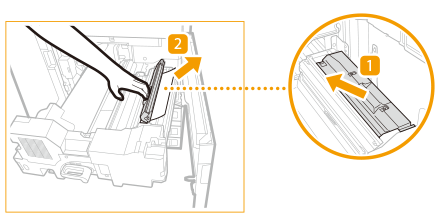 |

When you release the C4 guide, it Closes.
5
If paper is left on the feeding belt (C5), remove all the paper.
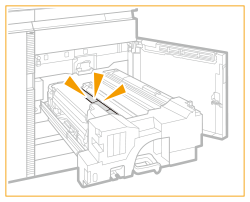
6
Check whether paper is jammed in the inner output unit.
| Open the inner output guide (C6).  | ||
| If paper is jammed, gently pull it out in the direction of the arrow with the inner output guide open. 
| ||
| Return the inner output guide to its original position. |
7
Return the fixing transport unit to its original position.
| Gently push the fixing transport unit back into the machine holding the C2 lever. When pushing in the fixing transport unit, the C2 lever you hold may move so that it pops up, but this is not a malfunction. Push it all the way in and proceed to the next step. |
| Turn the C2 lever to the right to lock. 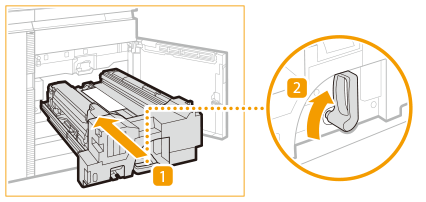 |
8
Gently close the front cover of the main unit until they click.
Continue following the instructions on the screen to proceed with the interrupted operation or continue clearing paper jams.