Paper Delivery Area
If you frequently use labels, glue on them may stick to the paper delivery area, causing paper jams. After using labels, use the following procedure to wipe off the glue residue from the paper delivery area.
1
Turn OFF the machine, and unplug the power cord from the AC power outlet.

Check the operation status of the machine before turning the power OFF. You can turn the power OFF even if the machine is executing an operation, but this may cause the operation to be interrupted or data to become damaged.
2
Wipe off the glue residue sticking to the paper delivery area.
Wipe off the glue residue using a soft, well-wrung-out cloth dampened with water or a mild detergent diluted with water.
 For the paper drawer

Also use the following procedure to remove the glue residue from the optional paper feeder or cassette feeding unit.
1 | Pull out the paper drawer until it stops. 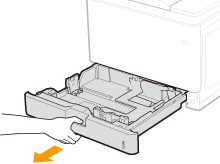 |
2 | Wipe off the glue residue sticking to the paper guides. When there is paper loaded in the paper source in question, remove the paper before proceeding to the wipe-off operation. 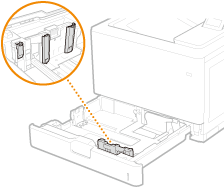 |
3 | Set the paper drawer. If paper was loaded, reload paper. Loading Paper in the Paper Drawer |
4 | Open the right cover. 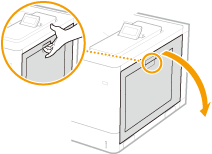 |
5 | Wipe off the glue residue sticking to the interior of the main unit. 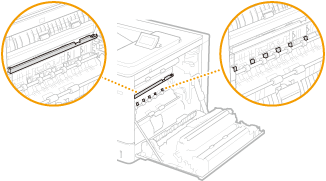 When wiping off the glue residue sticking to the interior of the main unit, take care not to touch the ITB unit or the automatic paper type detection sensor. 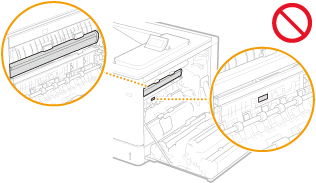 |
6 | Close the right cover. |
For the multi-purpose tray
1 | Open the cover. 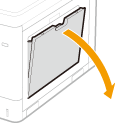 |
2 | Wipe off the glue residue sticking to the paper guides. 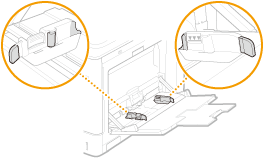 |
3 | Remove the cover for the feeder rollers. 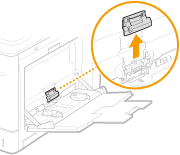 |
4 | Pull out the upper feeder roller. 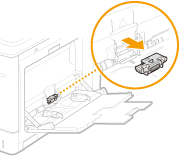 |
5 | Wipe off the glue residue sticking to the feeder roller. 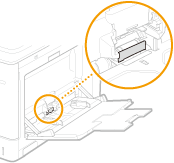 |
6 | Place the removed feeder roller back into position. |
7 | Place back the cover for the feeder rollers. |
8 | Close the cover. |
9 | Open the right cover. |
10 | Wipe off the glue residue sticking to the interior of the main unit. 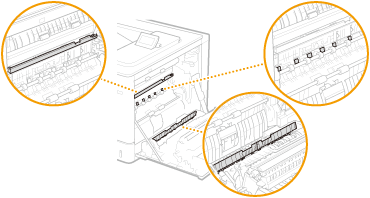 When wiping off the glue residue sticking to the interior of the main unit, take care not to touch the ITB unit or the automatic paper type detection sensor. |
11 | Close the right cover. |
3
Wipe off the glue residue sticking to the output tray.
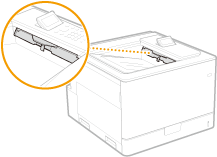
4
Wait for the exterior of machine to dry completely.
5
Reconnect the power cord and turn ON the machine.