Paper Jams inside the Right Cover or in the Paper Drawer
If there is paper loaded in the multi-purpose tray, remove it first, and close the tray. If the jammed paper cannot be removed easily, do not try to forcibly remove it but instead proceed to the next step.
1
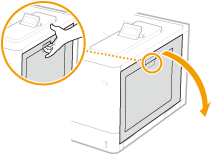
Open the right cover.
2
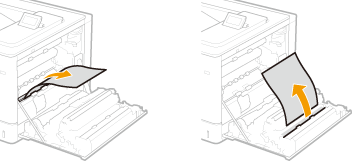
Gently pull out the paper.
 Paper Jams in the Fixing Assembly
1 | Hold the handles on both sides of the fixing assembly, and pull out the fixing assembly straight toward you. 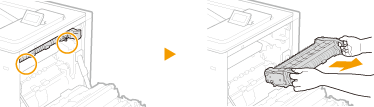 |
2 | Hold the levers on both sides, and lift them up to open the cover. 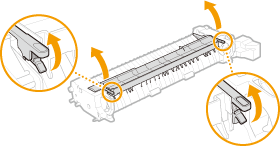 |
3 | Gently pull out the paper. Pull out the paper while holding it as horizontally as possible to prevent unfixed toner from falling. 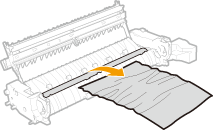 |
4 | Close the cover. |
5 | Place the fixing assembly back into position. Fully push it in until it cannot go any further. 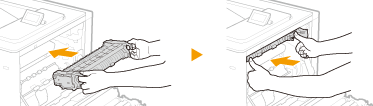  Push on the handles to check that the fixing assembly has been pushed in until it cannot go any further. If the fixing assembly is not securely placed in position, an error message may appear. |
3
Remove the jammed paper in the paper drawer.
1 | Pull out the paper drawer until it stops. 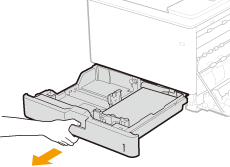 |
2 | Gently pull out the paper. 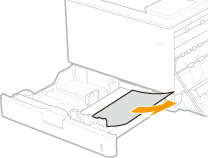 |
3 | Set the paper drawer. |
4
Close the right cover.
When the Optional Paper Feeder Is Installed
1 | Open the right cover of the paper feeder. 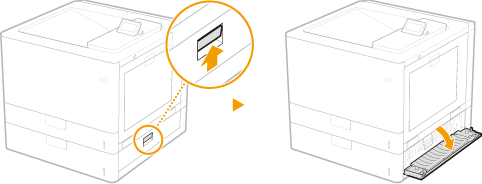 |
2 | Gently pull out the paper. 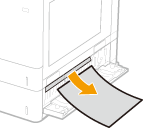 |
3 | Pull out the paper drawer until it stops, and gently pull out the paper. 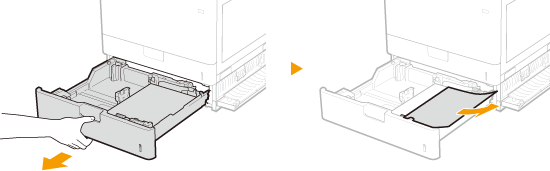 |
4 | Set the paper drawer. |
5 | Close the right cover of the paper feeder. |
When the Optional Cassette Feeding Unit Is Installed
1 | Open the right cover of the cassette feeding unit. 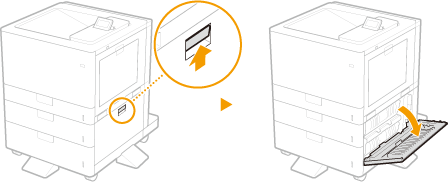 |
2 | Gently pull out the paper. 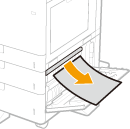 |
3 | Pull out the paper drawer until it stops, and gently pull out the paper. 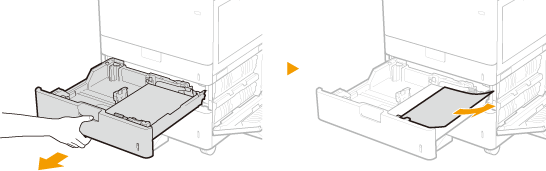 |
4 | Set the paper drawer. |
5 | Close the right cover of the cassette feeding unit. |

When the message is still displayed
Paper may be jammed in other locations. Check other locations, and remove jammed paper if any. If the message is still displayed, check whether the right cover is securely closed.