[Home] Screen
This screen is displayed when you press [ ] on the control panel.
The status of the machine is displayed at the top and bottom of the screen for quick viewing and operations, as needed.
] on the control panel. The status of the machine is displayed at the top and bottom of the screen for quick viewing and operations, as needed.
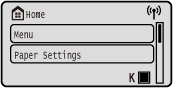
Status of the Machine
[ ]
]
When connected to a wireless LAN, [] is displayed.
]When connected to a wireless LAN, [
] is displayed.[ ]
]
Displays the remaining amount of toner in the toner cartridge.
]Displays the remaining amount of toner in the toner cartridge.
Function and Setting Buttons
[Paper Settings]
Set the paper size and type to use, and register frequently used paper. Specifying the Paper Size and Type
Set the paper size and type to use, and register frequently used paper. Specifying the Paper Size and Type
[Secure Print]
Prints data temporarily saved in the memory of the machine. Printing a Document Secured with a PIN (Secure Print)
Prints data temporarily saved in the memory of the machine. Printing a Document Secured with a PIN (Secure Print)
[Display Order (Home)]
You can change the display order of the items on the [Home] screen. Customizing the [Home] Screen
You can change the display order of the items on the [Home] screen. Customizing the [Home] Screen
[Wireless LAN Set.]
Connects a computer to the machine via a wireless LAN router (access point). Connecting to a Wireless LAN by Searching for a Router (Access Point Setup Method)
Connects a computer to the machine via a wireless LAN router (access point). Connecting to a Wireless LAN by Searching for a Router (Access Point Setup Method)