Checking the Number of Printed Pages (Check Counter)
You can display a counter showing the total number of pages printed to date.
The number of printed pages includes printed reports and lists.
The number of printed pages includes printed reports and lists.
This section describes how to check the number of printed pages using the control panel.
You can also check this information using Remote UI from a computer. Checking Usage and Logs with Remote UI
You can also check this information using Remote UI from a computer. Checking Usage and Logs with Remote UI
1
Press  on the control panel. Control Panel
on the control panel. Control PanelThe [Status Monitor] screen is displayed.
2
Press [Device Status] 
 [Check Counter] .
[Check Counter] .The [Check Counter] screen is displayed.
3
Select the item you want to check, and press .
.4
Check the number of printed pages.
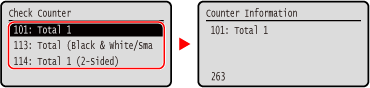
[101: Total 1]
Displays the total number of pages printed.
[113: Total (Black & White/Small)]
Displays the total number of pages printed in black and white.
[114: Total 1 (2-Sided)]
Displays the total number of pages printed with 2-sided.