User Account Menu
The following operations can be performed in the user account menu.
Checking your e-mail address registered to Cloud Connector
Checking your personal data registered to Cloud Connector
Deleting the account (this means that Cloud Connector applications other than the Email print for guests function can no longer be used)
1
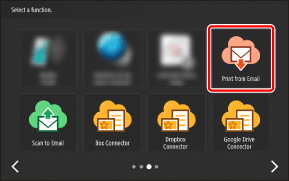
On the Home screen, press one of the buttons for the Cloud Connector applications.
2
Enter the PIN code, and press [Login].
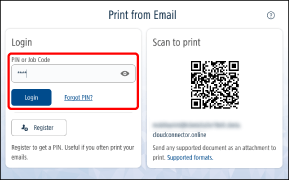
The design of the screen differs according to the application.
3
Press [ ] and select [Your account] from the menu.
] and select [Your account] from the menu.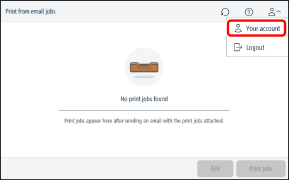
4
Perform the desired operation.
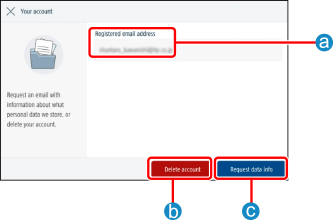
 [Registered email address]
Displays the e-mail address registered to Cloud Connector.
 [Delete account]
Deletes all the information registered to Cloud Connector. Note that pending jobs will also be deleted.
 [Request data info]
Sends an e-mail describing what kind of personal information is registered to Cloud Connector and how it is processed.